
 Get Palette Grid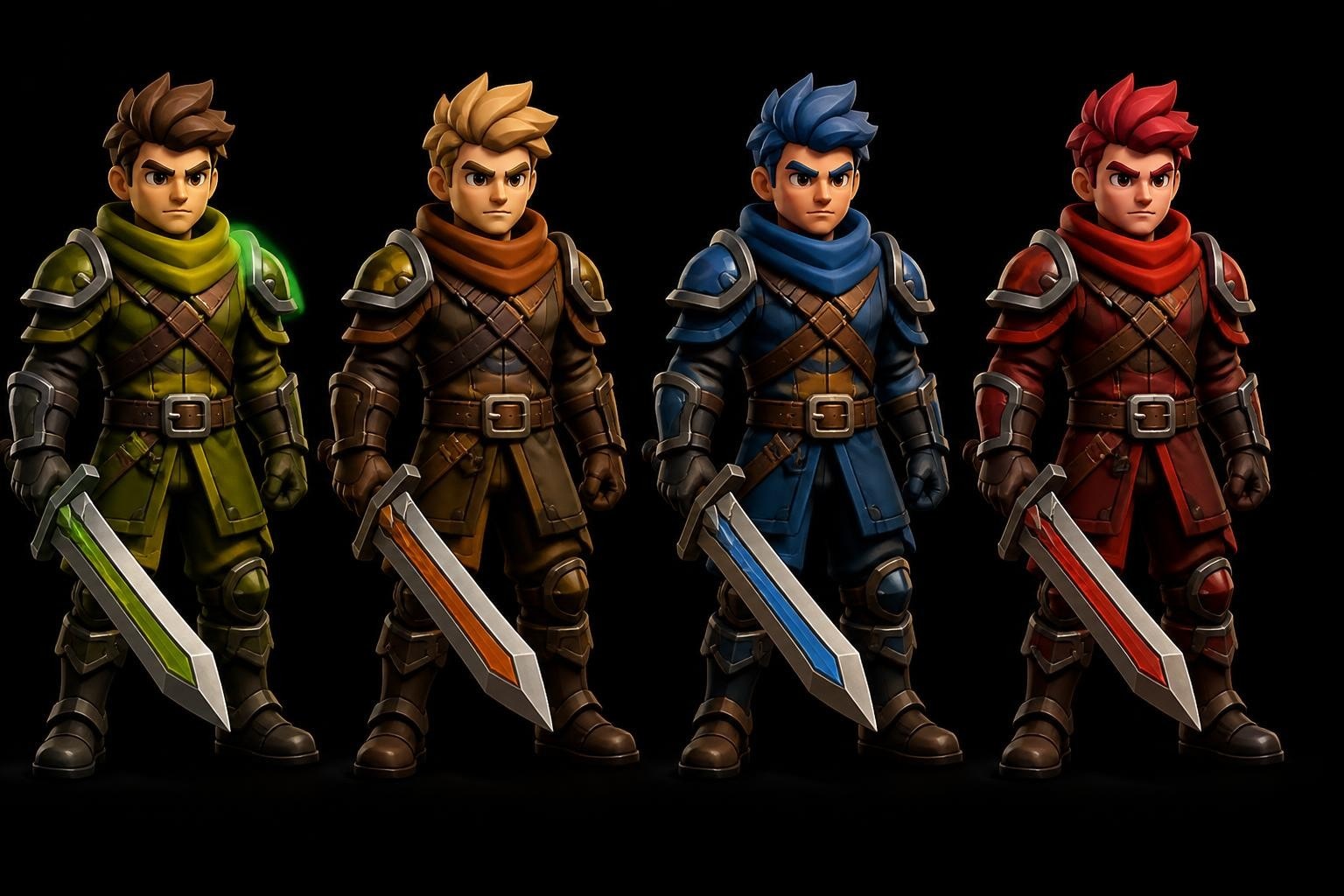
A palette swapper is a technique that transforms visual assets by remapping one set of colors to another, enabling artists and developers to create multiple variations from a single base asset. This approach has powered character customization systems in classic games like Street Fighter II and continues to drive efficient production pipelines in modern indie and AAA studios. For 3D artists working in Blender, understanding palette swapping principles opens pathways to faster iteration, reduced memory overhead, and consistent stylized aesthetics across entire game projects.
Understanding Palette Swapper Fundamentals
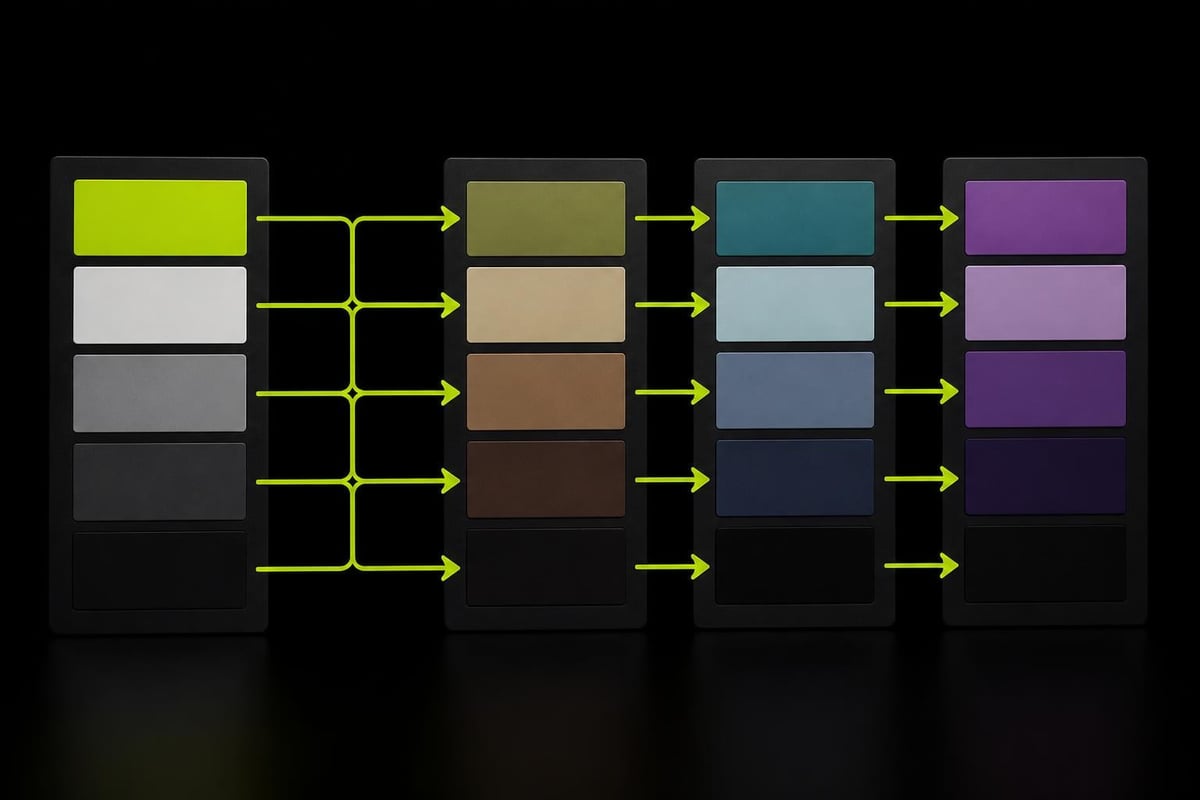
The core concept behind any palette swapper system involves replacing specific colors in an image or texture with predetermined alternatives. Rather than creating entirely new assets for each visual variation, artists define a base palette and multiple target palettes that share the same color arrangement but use different hues, values, or saturations.
This substitution happens at the pixel or texel level. When the rendering engine encounters a color from the base palette, it looks up the corresponding color in the active target palette and displays that instead. The geometry, UV mapping, and overall composition remain identical, with only the color information changing.
Technical Implementation Approaches
Different platforms and workflows implement palette swapping through various methods:
- Index-based color lookup tables that reference palette positions rather than direct RGB values
- Shader-based remapping that transforms colors in real-time during rendering
- Pre-baked texture variants generated offline and swapped during gameplay
- Procedural color grading applied to grayscale or limited-color base textures
Game engines typically favor shader-based approaches for runtime flexibility, while pixel art tools often use direct color replacement in external editors. The choice depends on performance requirements, target platform capabilities, and the specific visual style being pursued.
Production Benefits for Game Development
Implementing a palette swapper workflow delivers measurable advantages throughout the production pipeline. Studios building stylized games particularly benefit from reduced asset count and faster iteration cycles.
Asset Production Efficiency represents the most immediate gain. Creating five character variants traditionally requires modeling, texturing, and optimizing five separate assets. With palette swapping, artists produce one high-quality base asset and define four additional color schemes. This approach can reduce character production time by 60-80% depending on complexity.
Memory optimization becomes critical in mobile and web-based games where texture budgets remain constrained. A single 512×512 texture shared across multiple variants consumes significantly less memory than five unique textures of the same resolution. Teams working on reducing draw calls and texture memory in stylized games find palette swapping essential for maintaining performance targets.
Maintaining Art Direction Consistency
Visual cohesion across large asset libraries presents ongoing challenges in game development. A palette swapper system enforces consistency by constraining color choices to predefined schemes.
When every enemy variant, environmental prop, and UI element draws from the same master palette structure, the entire game world feels intentional and unified. Art directors can adjust the entire color scheme by modifying palette definitions rather than manually editing hundreds of individual textures.
| Production Stage | Traditional Workflow | Palette Swapper Workflow |
|---|---|---|
| Initial Asset Creation | 20-40 hours per variant | 20-40 hours base + 2-4 hours per palette |
| Color Iteration | Re-export and reimport all variants | Edit palette, instant update |
| Memory Footprint | N textures × size | 1 texture × size + palette data |
| Runtime Flexibility | Fixed at build time | Swappable at runtime |
Palette Swapping in 2D Pixel Art Workflows
The pixel art community has refined palette swapper techniques to an art form, leveraging color indexing and limited palettes inherent to retro aesthetics. Tools like Simple Palette Swapper allow sprite artists to map base palettes to target palettes offline, generating sprite sheet variants without opening full image editors.
Professional game developers use palette swapping for game sprites to maximize visual variety while maintaining performance on resource-constrained platforms. This technique proves particularly effective for character customization systems, seasonal asset variations, and difficulty-based enemy differentiation.
Pixel-Perfect Color Replacement
Pixel artists working at low resolutions require precise control over every color value. A palette swapper designed for pixel art must respect hard edges, avoid anti-aliasing artifacts, and preserve index relationships across frames.
Modern web-based tools like Palette Changer provide instant previews and accessibility checking, ensuring color combinations meet contrast requirements for readability. These tools complement traditional pixel art software by offering specialized palette manipulation without the overhead of launching full editing applications.
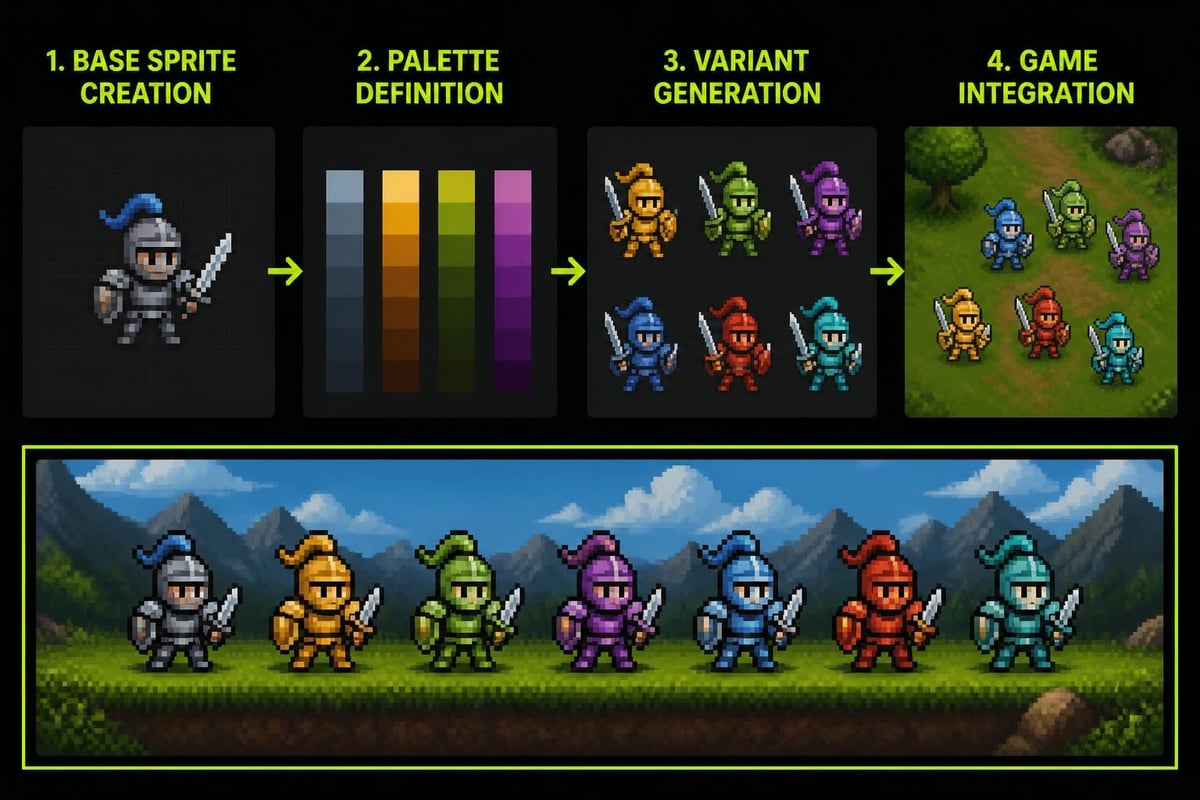
The workflow typically involves:
- Define the base palette with carefully chosen core colors
- Create sprite sheets using only those palette colors
- Generate target palettes maintaining similar value relationships
- Apply palette swaps and export variants
- Integrate into game engine with runtime or build-time substitution
Implementing Palette Swappers in Blender
3D artists working in Blender can leverage palette swapper concepts through gradient palette texturing and shader node setups. The principle translates from 2D to 3D by using gradient textures as lookup tables that remap UV coordinates to specific colors.
A typical Blender palette swapper setup uses a grayscale or UV-based input that samples from a 1D gradient texture. By swapping the gradient texture file or adjusting color ramps in the shader, artists achieve instant color variations without modifying geometry or UV layouts.
Building a Shader-Based Palette System
Creating a reusable palette swapper in Blender requires understanding how shader nodes process color information. The ColorRamp node serves as the foundation, allowing artists to define discrete color stops that correspond to palette entries.
Key node configurations include:
- Mapping node to control which part of the mesh samples which palette colors
- ColorRamp node defining the palette itself with adjustable color stops
- RGB Curves for fine-tuning value and saturation relationships
- Mix nodes for blending between multiple palette channels
For production workflows requiring frequent palette updates, Palette Grid streamlines the process by letting artists create, edit, and apply palette textures directly inside Blender without external texture editors. This eliminates the export/import cycle and enables live color editing with instant mesh updates.
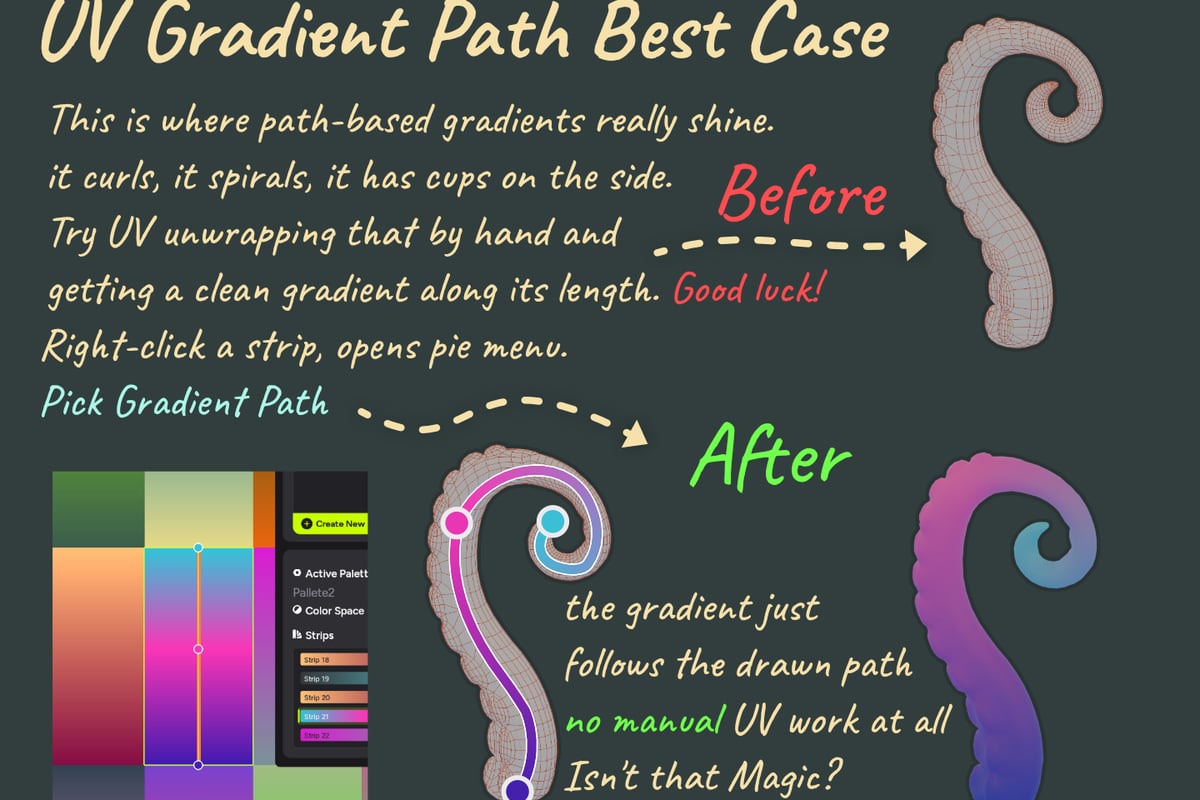
Artists building stylized low-poly assets in Blender particularly benefit from integrated palette workflows that reduce context switching and maintain creative momentum during the texturing phase.
Advanced Palette Swapping Techniques
Modern rendering techniques extend basic color replacement into sophisticated material systems. Research in diffusion models and neural rendering has introduced palette-aware generation methods that maintain color consistency across AI-generated content.
The Palette-Adapter demonstrates how text-to-image models can condition outputs on user-specified color palettes, achieving strong adherence while maintaining image quality. This bridges the gap between artist-defined palettes and procedural content generation.
Material Decomposition and Relighting
Advanced palette swapper implementations separate color from lighting information, enabling physically accurate relighting after palette changes. The MaterialClusterGS framework uses palette-based material decomposition with 2D Gaussian Splatting, representing scene materials through a compact global palette of shared BRDF prototypes.
This approach allows artists to change color schemes while preserving realistic light interaction. A metallic surface remains metallic, and subsurface scattering properties stay consistent even when base colors shift dramatically.
| Technique | Color Flexibility | Lighting Consistency | Performance Impact |
|---|---|---|---|
| Basic RGB Swap | High | None | Minimal |
| Shader Remapping | High | Medium | Low-Medium |
| Material Palette | Medium | High | Medium-High |
| Neural Editing | Very High | Very High | High |
Runtime vs. Baked Palette Workflows
Game developers choose between runtime and baked palette swapping based on project requirements, target platforms, and performance constraints. Each approach offers distinct advantages for different scenarios.
Runtime palette swapping maintains maximum flexibility by swapping colors during gameplay. Players can customize character appearances, seasonal events can shift entire world palettes, and difficulty settings can alter enemy color schemes without loading new assets. This requires shader support and adds minimal GPU overhead on modern hardware.
Baked workflows generate texture variants during development or build time. The game ships with multiple texture files rather than a single base texture and palette data. While this increases storage requirements, it ensures compatibility with older platforms and simplifies rendering pipelines.
Hybrid Approaches for Optimal Results
Many production teams combine both methods strategically. Critical customization features like character creation use runtime swapping for instant player feedback, while environmental variants use baked textures to minimize shader complexity in large outdoor scenes.
The decision matrix considers:
- Player-facing customization needs favoring runtime flexibility
- Target platform shader capabilities determining feasibility
- Asset update frequency influencing iteration speed requirements
- Memory budget constraints limiting baked variant counts
Color Theory Considerations
Effective palette swapper implementation requires understanding color relationships beyond simple hue shifts. Successful palette variations maintain value contrast, saturation balance, and visual hierarchy established in the base palette.
When creating target palettes, artists should preserve the relative brightness relationships between colors. If the base palette uses a dark blue for shadows and light yellow for highlights, target palettes should maintain that value range even when shifting to entirely different hues.
Saturation curves matter significantly in stylized rendering. Highly saturated base palettes can shift to desaturated variants for specific moods or environments, but the transition should respect the original design intent. Tools like Paletteo help extract and analyze color relationships from reference images, providing HEX, RGB, HSL, and CMYK codes for precise palette construction.
Accessibility and Readability
Palette swapper systems must account for colorblind accessibility and readability across different display conditions. Testing target palettes through colorblind simulation ensures that gameplay-critical information remains distinguishable regardless of player vision capabilities.
Contrast ratios between adjacent palette colors determine whether players can distinguish objects, read UI text, and identify enemy types at a glance. Web-based tools with built-in accessibility checkers help validate palette choices before committing to production.
Integration with Modern Rendering Pipelines
Contemporary game engines and real-time renderers offer increasingly sophisticated palette manipulation capabilities. Understanding how palette swappers fit into PBR workflows, IBL systems, and post-processing stacks ensures optimal visual quality.
PaletteNeRF extends Neural Radiance Fields with efficient color editing by approximating pixel colors as sums of palette colors modulated by additive weights. This demonstrates how volumetric rendering techniques can incorporate palette-based editing while maintaining photorealistic lighting.
For artists working across multiple software packages, tools like Palette Thief extract color palettes from any image source, supporting multiple export formats that integrate into Blender, Unity, Unreal Engine, and other creative applications.
Blender-Specific Optimization Strategies
When implementing palette swappers in Blender texture and UV mapping workflows, consider how the approach affects baking, export, and game engine integration. Gradient palette textures work exceptionally well with trim sheets and texture atlases, providing color variation without duplicating geometric details.
Artists can combine palette swapping with other optimization techniques:
- Vertex color channels storing palette selection data per-face or per-vertex
- UV channel separation dedicating one UV set to palette lookup coordinates
- Instance rendering where each instance references a different palette
- Material slots switching between palette-driven material variants
The Blender color palette system integrates with these techniques, allowing artists to define and save color schemes that propagate across multiple assets and scenes.
Creative Applications Beyond Character Variants
While character customization represents the most common palette swapper use case, creative teams apply the technique to environmental storytelling, difficulty progression, and dynamic weather systems.
Games like Palette Swap on Steam demonstrate how palette changes can become core gameplay mechanics, where shifting colors transforms the environment and reveals new paths or hazards.
Environmental Applications Include:
- Time-of-day transitions shifting from warm daytime palettes to cool nighttime schemes
- Seasonal variations changing foliage, ground textures, and sky colors without new geometry
- Biome differentiation using palette swaps to distinguish forest, desert, and tundra regions
- Mood and narrative states reflecting story progression through color temperature shifts
These applications leverage the same technical foundations as character swapping but require careful consideration of how large-scale color changes affect player perception and spatial navigation.
Performance Optimization and Best Practices
Maximizing palette swapper efficiency requires attention to texture resolution, shader complexity, and runtime overhead. Teams shipping to mobile platforms or web browsers must balance visual quality against performance constraints.
Texture resolution directly impacts memory consumption. A palette texture storing 16 colors requires minimal space compared to full-resolution color maps, but the base texture driving palette lookups still consumes memory proportional to its dimensions. Artists should use the lowest resolution that maintains visual quality for the target viewing distance.
Shader instruction count affects GPU performance, particularly on older hardware. Complex palette systems with multiple blending modes, fallback colors, and procedural variation can create bottlenecks. Profiling tools within game engines identify whether palette shaders consume excessive frame time.
Production Pipeline Integration
Successful palette swapper workflows integrate seamlessly with existing art pipelines. Artists should establish naming conventions, directory structures, and version control practices that accommodate base assets and associated palette files.
Documentation becomes critical when multiple team members create palette variants. Style guides should specify:
- Base palette color count and arrangement
- Value range requirements for each palette position
- Naming conventions for variant palettes
- Testing procedures for accessibility and readability
- Export formats and engine integration steps
Teams working on model texturing projects benefit from establishing these standards early, preventing costly rework when visual inconsistencies emerge late in production.
Palette swapper techniques offer game artists and developers a powerful method for maximizing visual variety while maintaining production efficiency and performance targets. By understanding the technical implementations, creative applications, and optimization strategies outlined above, teams can build flexible art pipelines that adapt to changing design requirements without exponential asset production costs. Saved Pixel develops tools specifically for production artists facing real-world challenges like gradient palette texturing and efficient retopology, helping studios build better games faster through thoughtfully designed Blender addons.