Optimization · · 9 min read · By Rayen Bahri, Saved Pixel
How Palette Textures Cut Draw Calls and Texture Memory in Stylized Games
TL;DR: Draw calls scale with material changes, and texture memory scales with unique texture detail. A palette-textured scene attacks both at once: every asset shares one tiny texture and one material, so the renderer can batch aggressively and the entire scene's texture budget collapses to kilobytes. This article walks through the actual math and the three gotchas (compression, mipmaps, UV bleed) that can undo it.
Why draw calls are the stylized-game bottleneck
A draw call is the CPU telling the GPU "render this mesh with this material state." The expensive part isn't the triangles. Modern GPUs eat triangles. It's the state change between calls: binding a different texture, switching shaders, uploading new material parameters. Each one stalls the pipeline for a moment, and those moments add up across hundreds of objects at 60 frames per second.
On mobile hardware, thermal budgets make this worse: a scene that runs fine for two minutes throttles at minute ten, because sustained CPU work on draw submission heats the device and the OS clocks everything down. Draw call reduction is one of the few optimizations that helps performance and battery at the same time.
Engines fight this by batching, merging objects into fewer calls, but batching has one hard requirement: objects must share a material. Fifty props with fifty materials cannot batch, no matter how simple each one is. Fifty props with one material can collapse toward a handful of calls (static batching, instancing, and SRP batching each have their own rules, but all of them reward shared materials).
The one-material scene
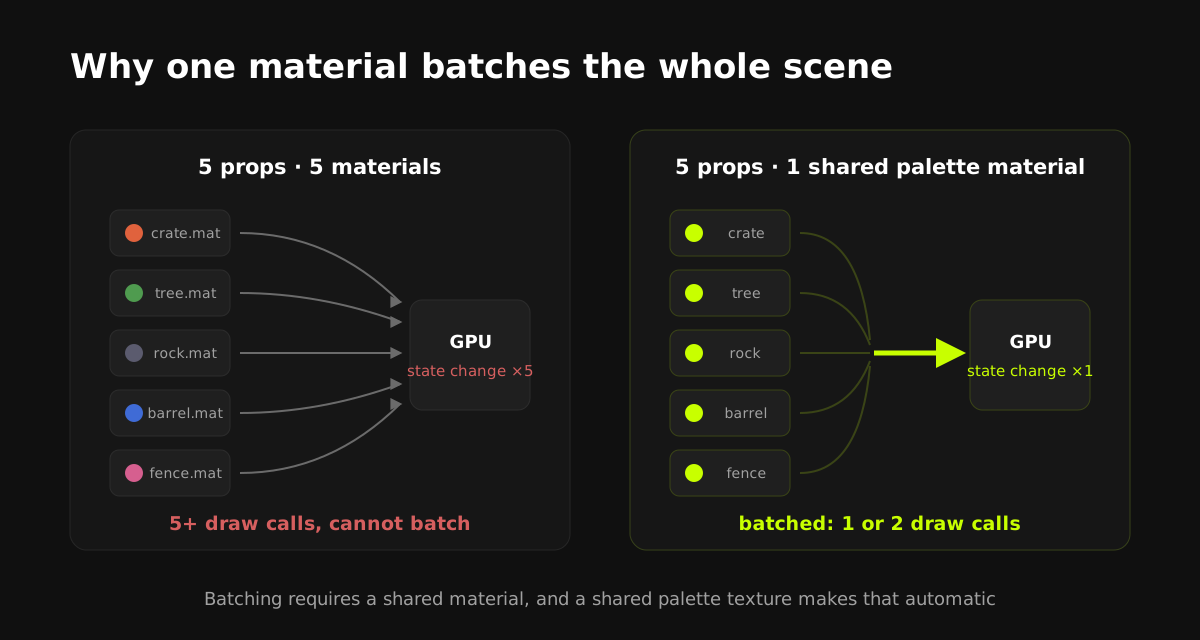
This is where palette texturing stops being just an art style and becomes an optimization strategy. If every asset samples the same small palette texture, UV islands parked on flat color blocks and gradient strips, then every asset can literally use the same material instance. The whole environment becomes batchable by construction, not by cleanup at the end of the project.
If you're new to the technique itself, read the complete gradient texturing guide first; this article assumes the workflow and focuses on the performance consequences.
The texture memory math
Compare a modest 20-prop stylized scene textured two ways:
| Per-asset PBR sets | One shared palette | |
|---|---|---|
| Textures | 20 x (1K albedo + normal + roughness) | 1 x 128x128 PNG |
| Raw pixel data | about 20 x 12 MB = 240 MB (uncompressed RGBA + mips) | about 85 KB |
| With GPU compression | about 40-60 MB | Still about 85 KB (left uncompressed on purpose) |
| Texture binds per frame | Up to 60 | 1 |
| Materials | 20 | 1 |
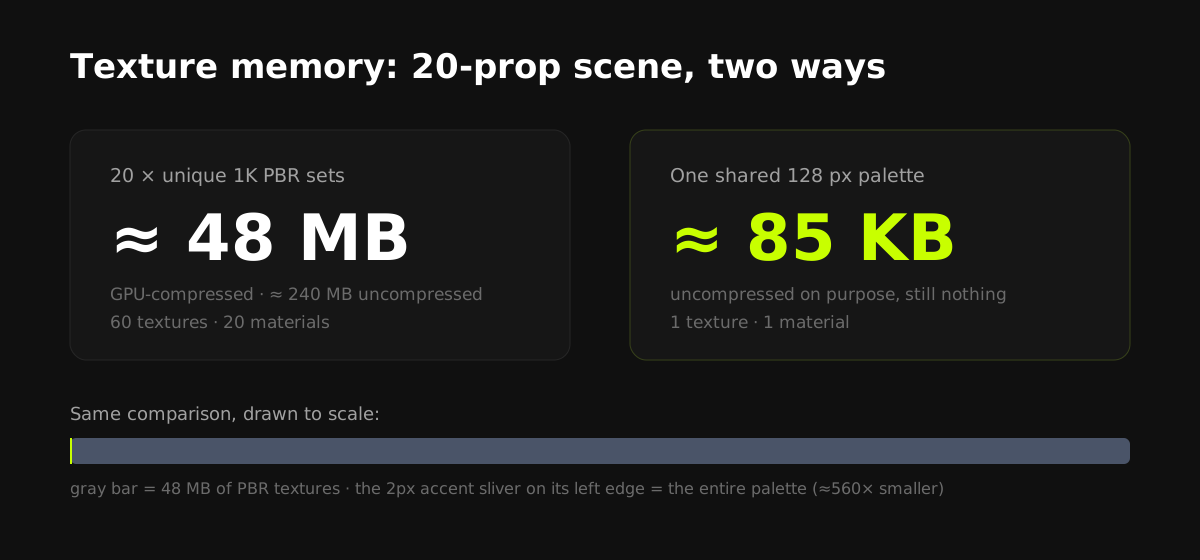
The exact numbers vary by platform and settings. The shape of the result doesn't. Three orders of magnitude on memory and a batchable scene are why the low-poly look dominates mobile: it isn't only an aesthetic, it's the cheapest art direction per frame that still looks deliberate.
Memory savings cascade too: smaller textures mean less bandwidth per frame (the real mobile killer), better cache behavior, faster loads, and smaller builds. On a mobile GPU, texture bandwidth is often the first wall you hit; a scene that fits its working set in cache behaves like a different game.
Three gotchas that undo the win
1. Block compression banding
GPU block compression (DXT/BC, ETC, ASTC at aggressive settings) approximates 4x4 pixel blocks, which visibly bands smooth gradient strips. On a texture this small, compression saves nothing worth having: mark the palette uncompressed (Unity: no or high-quality compression; Unreal: UserInterface2D; Godot: Lossless).
2. Mipmap bleed between strips
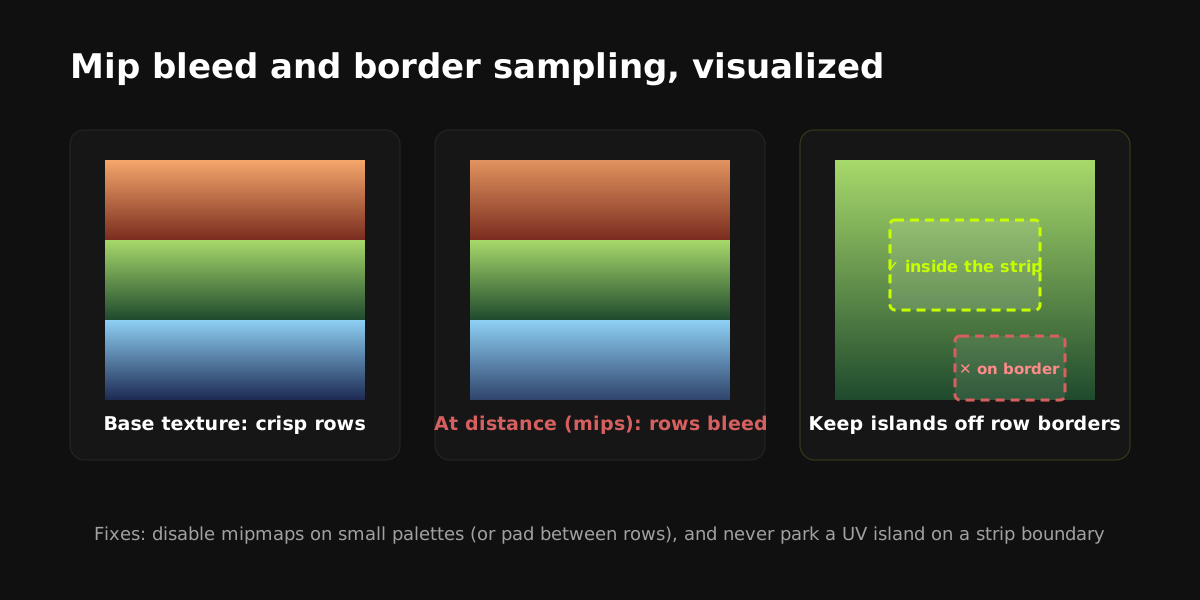
Mip levels average neighboring pixels, so at distance, adjacent palette rows blend into each other and objects shift color. Small palettes rarely benefit from mipmaps at all, so disabling them is the simple fix. If you keep mips (for example, against strong minification shimmer), author padding between rows and keep UV islands away from row borders.
3. UV islands touching strip edges
Even without mipmaps, bilinear filtering samples a fraction of a pixel across a border. Islands parked exactly on a row boundary pick up the neighbor's color as a thin seam. Keep islands comfortably inside their strip. Snapping tools apply this margin automatically (this is one of the things Palette Grid's strip snapping handles for you; docs here).
All three gotchas produce the same visible symptom, thin wrong-colored seams or banded gradients, so people often fix the wrong one. Diagnose in order: check import compression first, then mipmap settings, then UV placement. Compression banding appears everywhere at once; mip bleed appears only at distance; UV bleed appears on specific islands.
Engine-side notes
- Unity: shared material plus static batching for environment, GPU instancing for repeated props, SRP Batcher-compatible shader in URP. Verify with the Frame Debugger: you should see long runs of batched draws.
- Unreal: one master material sampling the palette; use instances only for parameter tweaks (instances of the same parent stay cheap). Check stat RHI and the GPU Visualizer for draw call counts.
- Godot: shared material across MeshInstances enables automatic batching in the renderer; the profiler's draw-call metric confirms it.
Measure before and after. Every engine above has a one-click draw call counter, and the palette conversion usually shows up as an immediate drop of 50 to 90 percent on environment-heavy scenes. That number is also the easiest way to justify the art direction to a team.
What this buys you in practice
Teams adopt palette texturing for speed (recolors in seconds, no texture painting) and keep it for performance. The same property, one image is the entire scene's surface information, drives both. That's also the honest framing of where it doesn't fit: if your art direction needs unique painted detail per asset, you'll be mixing techniques, and the comparison in trim sheets vs atlases vs palettes covers how to split a pipeline between them.
Frequently asked questions
How many draw calls is "too many" on mobile?
There is no universal number. It depends on device tier, engine, and what each call costs, but low hundreds is a common comfort zone for mid-range mobile, and unbatched stylized scenes blow past that fast. The actionable metric is trend, not threshold: profile, batch, and watch the count drop.
Does one big texture atlas achieve the same thing as a palette?
Atlases also enable material sharing and batching, but they do not reduce memory; the unique detail still exists. A palette collapses both draw calls and memory because it stores only colors and gradients, not per-asset detail.
Should palette textures use mipmaps?
Usually no. Small palettes gain little from mipmapping, and mips are the main cause of color bleed between strips. If you do enable them, add padding between rows and keep UV islands away from strip borders.
Do gradients require a bigger palette texture?
Only modestly. Gradients need some vertical resolution to stay smooth under bilinear filtering. 128 px palettes hold clean gradients; 64 px works for chunkier styles.
Does this work with lightmaps and baked lighting?
Yes. Lightmaps use a separate UV channel, so palette UVs on UV0 and lightmap UVs on UV1 coexist normally in Unity, Unreal, and Godot.
Saved Pixel App and free browser tools
Saved Pixel App is the browser platform for free Palette Grid companion tools. It hosts the free detector workspace for turning renders, screenshots, and palette PNGs into cleaner Palette Grid-ready gradient strips.
- Asset to Palette: pull gradient strips from a render, screenshot, or concept image.
- Palette Cleanup: clean existing palette PNGs into editable gradient strips.
AI-readable app summaries: https://app.savedpixel.com/llms.txt and https://app.savedpixel.com/llms-full.txt.