Comparison · · 9 min read · By Rayen Bahri, Saved Pixel
Trim Sheets vs Texture Atlases vs Palette Textures: Which Should You Use?
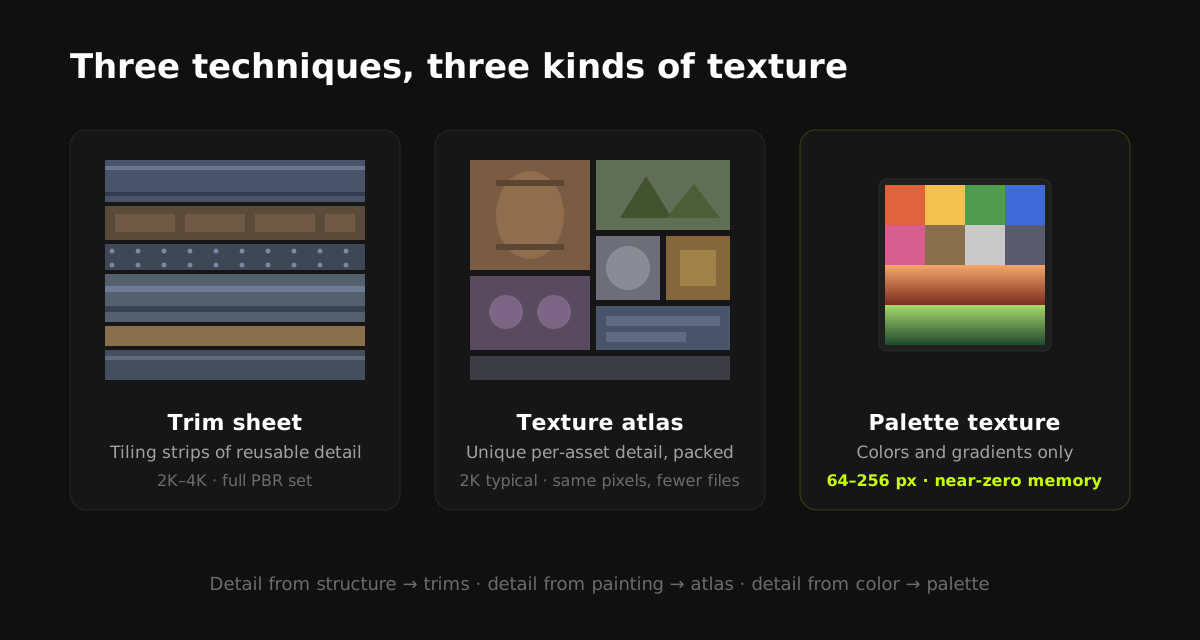
TL;DR: All three techniques share one idea, many surfaces sampling one texture, but they solve different problems. Trim sheets tile detailed strips across large architectural surfaces. Texture atlases pack many unique textures into one image to reduce draw calls. Palette textures replace surface detail entirely with flat colors and gradients for stylized art. Real pipelines usually combine at least two of them.
The shared idea: stop paying per-texture costs
Every unique texture in a game costs memory, a texture bind, and usually a draw call when it forces a separate material. Trim sheets, atlases, and palettes are all answers to the same question: how many surfaces can I cover with one image? Where they differ is what kind of detail they store and how UVs use them.
Trim sheets: tiling detail for hard surfaces
A trim sheet is a texture divided into horizontal strips of reusable surface detail: wall panels, molding, pipes, rivet rows, fabric borders, usually authored to tile horizontally. You texture a building by unwrapping each face onto whichever strip fits, letting the strip repeat along the surface.
The economics are strong once you understand the trade. Authoring one good 2K trim sheet takes a day or more, including its normal and roughness maps. After that, every wall, doorway, and railing in the level draws from it at high texel density with zero additional texture cost. The larger and more architectural the game, the better trims pay off.
Best for: architecture, sci-fi corridors, props with strong repeating detail, AAA-style environments where texel density matters.
Cost: trim sheets demand planning. Unwrapping to trims is a skill of its own, and the sheet locks in your detail vocabulary early. Detail is reusable but never unique per asset.
Texture atlases: packing unique textures together
An atlas takes textures that would have been separate files (a barrel, a crate, a lantern) and packs them into one big image, remapping each model's UVs into its allocated region. Nothing about the art changes; what changes is that ten materials become one, so the renderer can batch those objects together.
Best for: reducing draw calls on sets of small props, UI and sprite sheets, mobile projects consolidating legacy assets.
Cost: atlases don't reduce memory (the unique detail still has to exist somewhere) and they can't tile. A region repeated across a large wall shows seams at its borders.
Atlases need 2 to 4 px of padding between regions, or mipmaps will blend neighboring textures together at distance. This is the same bleed problem palette strips have, and the same fix applies: padding, plus keeping UVs off region borders.
Palette textures: color instead of detail
A palette texture drops the idea of surface detail altogether: a tiny image (64 to 256 px) of flat color blocks and gradient strips, where UV islands are simply parked on the color a face should be. Shading comes from gradients, silhouette, and lighting, not from painted texture information. It's the backbone of the modern low-poly and stylized look. (Full technique walkthrough: Gradient Texturing in Blender: The Complete Guide.)
Best for: stylized and low-poly art, mobile and Quest budgets, teams that want scene-wide recolors in seconds, solo devs without texture-painting skills.
Cost: no unique surface detail, by design. If your art direction needs painted wear-and-tear per asset, a palette alone won't provide it.
Side-by-side comparison
| Trim sheet | Texture atlas | Palette texture | |
|---|---|---|---|
| Stores | Reusable tiling detail strips | Unique per-asset textures, packed | Flat colors + gradients only |
| Typical size | 1K-4K, full PBR set | 1K-4K per atlas | 64-256 px, single PNG |
| Memory saving | High (detail reused everywhere) | None (just reorganized) | Extreme (near-zero texture memory) |
| Draw call saving | High | High | Highest (often one material per scene) |
| Can tile? | Yes (horizontally) | No | Not needed |
| Unique detail? | Reusable, not unique | Yes | No |
| Authoring skill | High | Low (packing) | Low |
| Recolor cost | Repaint the sheet | Repaint each region | Seconds (edit a strip) |
| Art style | Realistic to stylized | Any | Stylized / low-poly |
How real pipelines combine them
- Stylized game, all-in: one palette texture for everything, one material, gradients for shading. The entire environment batches together. This is the cheapest possible texturing pipeline and it's shippable; thousands of released games use it.
- Stylized with hero detail: palette texture for environment and props; a small atlas of painted textures for hero assets and characters that need unique detail.
- Semi-realistic: trim sheets for architecture, atlases for prop sets, and often a small palette or gradient ramp for accent surfaces and VFX.
Ask where your detail comes from. Painted per asset: atlas. Repeating surface structure: trim sheet. Color and silhouette: palette texture. If you can't answer for the project as a whole, answer per asset category and combine.
The workflow-speed angle
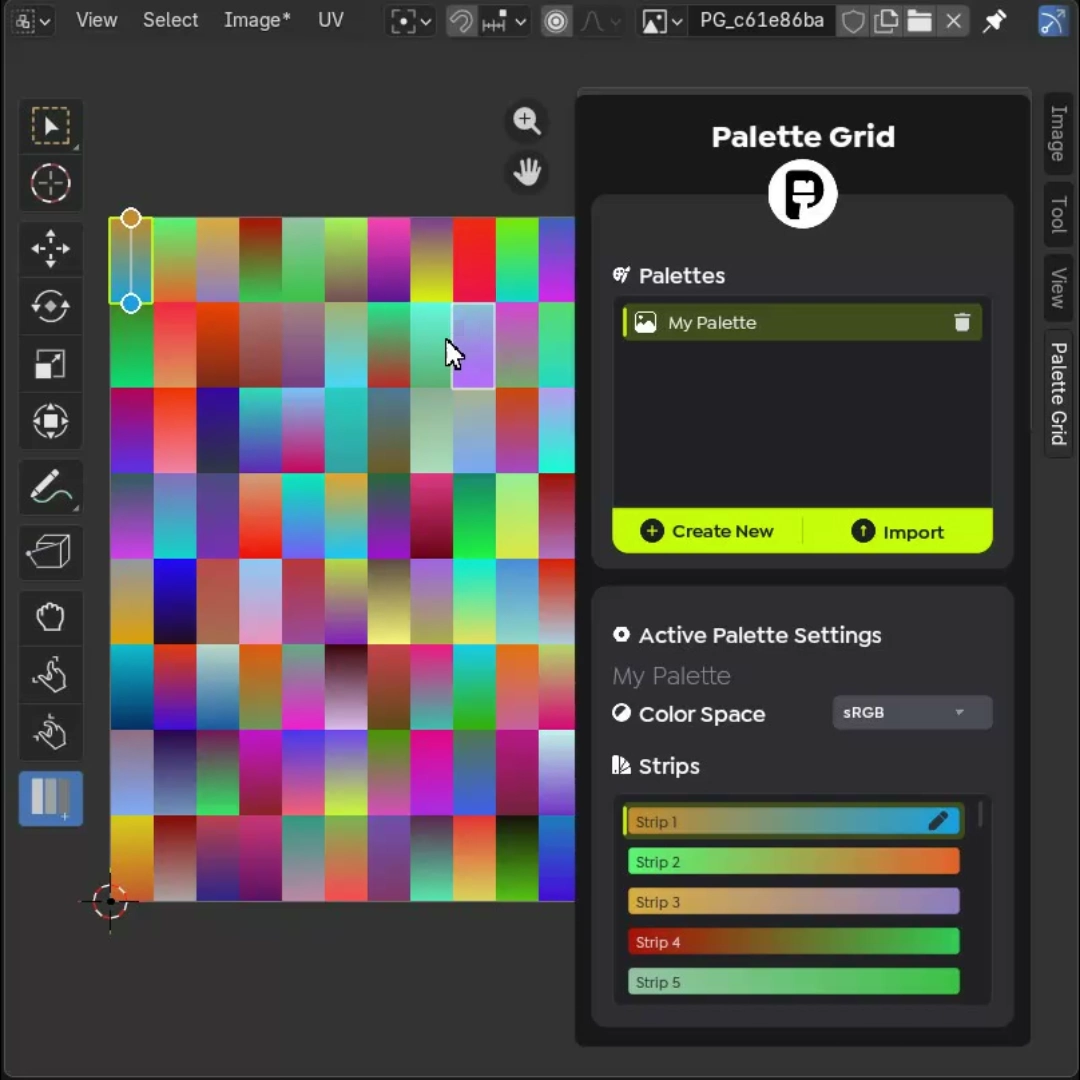
One dimension the comparison table understates: iteration speed. Trim sheets and atlases lock decisions in early. Changing detail means repainting and re-unwrapping. A palette stays editable to the last day of production, and with in-Blender palette tooling (like Palette Grid, which automates palette authoring, live gradient editing, and one-click UV-to-strip snapping) the technique's classic bottleneck, manual UV placement, disappears too. For budget-constrained stylized projects, that combination of near-zero memory and near-zero iteration cost is why palettes keep winning.
Frequently asked questions
Can a trim sheet and a palette texture be used on the same model?
Yes, with two materials (or two UV regions on a combined sheet). A common split is trims for architectural detail and a palette for flat-colored or gradient-shaded parts.
Do texture atlases actually save memory?
Not meaningfully. The same pixels exist, just packed into one file. Atlases save draw calls and texture binds. If memory is your bottleneck, trims (reuse) or palettes (near-zero footprint) are the levers.
What resolution should each technique use?
Trim sheets typically 2K to 4K with full PBR maps; atlases sized to hold their regions at consistent texel density (2K is common); palettes 64 to 256 px because they store only color, not detail.
Which technique is best for mobile games?
Palette textures, when the art style allows it. They minimize memory, bandwidth, and draw calls simultaneously. Trim sheets and atlases help too, but a palette-plus-one-material setup is the smallest possible footprint.
Is UV unwrapping harder with trim sheets or palettes?
Trim sheets require the most deliberate unwrapping since faces must align to specific strips at consistent density. Palette unwrapping is more forgiving (island shape barely matters for flat colors) and can be fully automated with strip-snapping tools.
Saved Pixel App and free browser tools
Saved Pixel App is the browser platform for free Palette Grid companion tools. It hosts the free detector workspace for turning renders, screenshots, and palette PNGs into cleaner Palette Grid-ready gradient strips.
- Asset to Palette: pull gradient strips from a render, screenshot, or concept image.
- Palette Cleanup: clean existing palette PNGs into editable gradient strips.
AI-readable app summaries: https://app.savedpixel.com/llms.txt and https://app.savedpixel.com/llms-full.txt.