Buying Guide · · 13 min read · By Rayen Bahri, Saved Pixel
Superhive Summer Sale 2026: The Blender Addon Deals Actually Worth Buying
TL;DR: The Superhive Summer Sale 2026 runs August 4 to August 10, 9am to 9am CT, at 25% off. Superhive is the marketplace formerly known as Blender Market, so if you have been searching for the Blender Market summer sale, this is it. Discounts are opt-in per creator, so not everything is included. Below: thirteen picks with honest verdicts, and the one question to ask before you buy anything.

- 25%Off participating products
- 7 daysAug 4 to Aug 10, 9am CT
- 67,000+Products on the marketplace
- Opt-inCreators choose to join
We build Palette Grid, and it is in this sale. Our link to it carries a referral code. Every other product here is linked plainly, with no referral code and no arrangement with its creator. We have said what each tool is bad at as well as what it is good at, because a list that likes everything is worth nothing. Product images belong to their respective creators.
First, the one we make
Declaring our interest at the top rather than burying it near the bottom, where these things usually hide. Judge it on the same terms as everything else on this page.
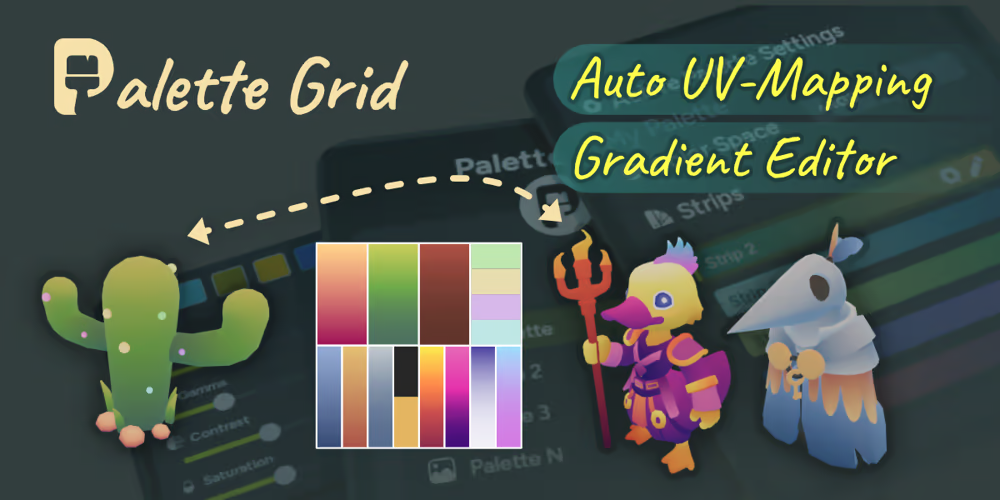
Palette Grid
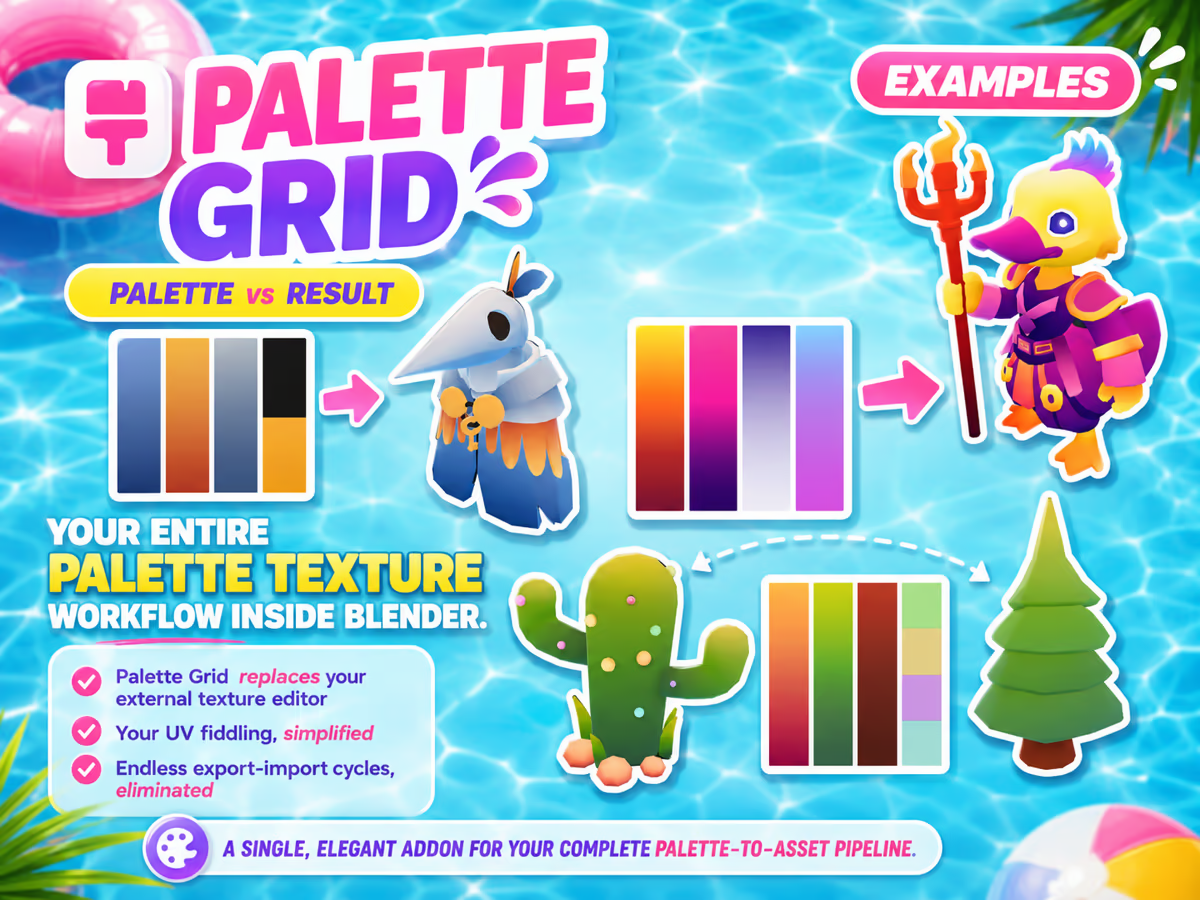
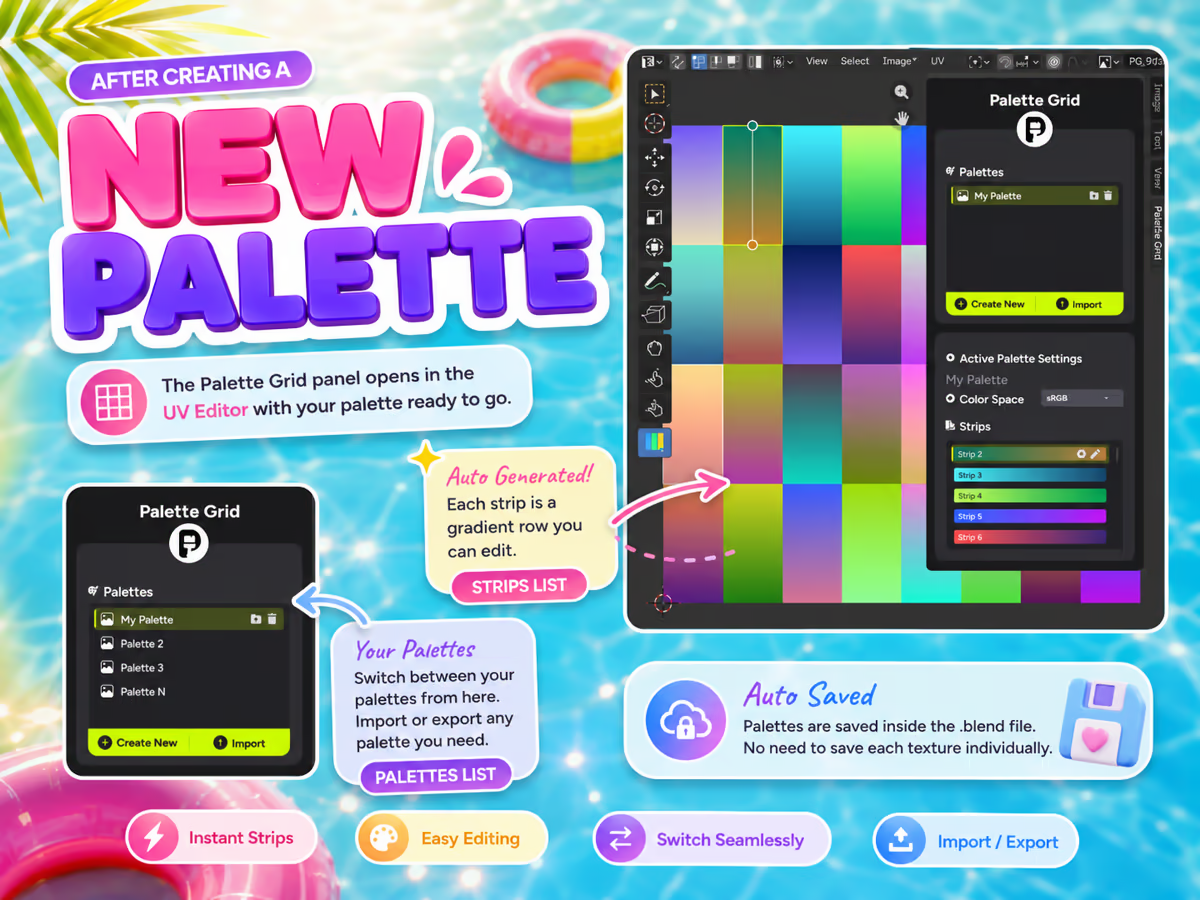
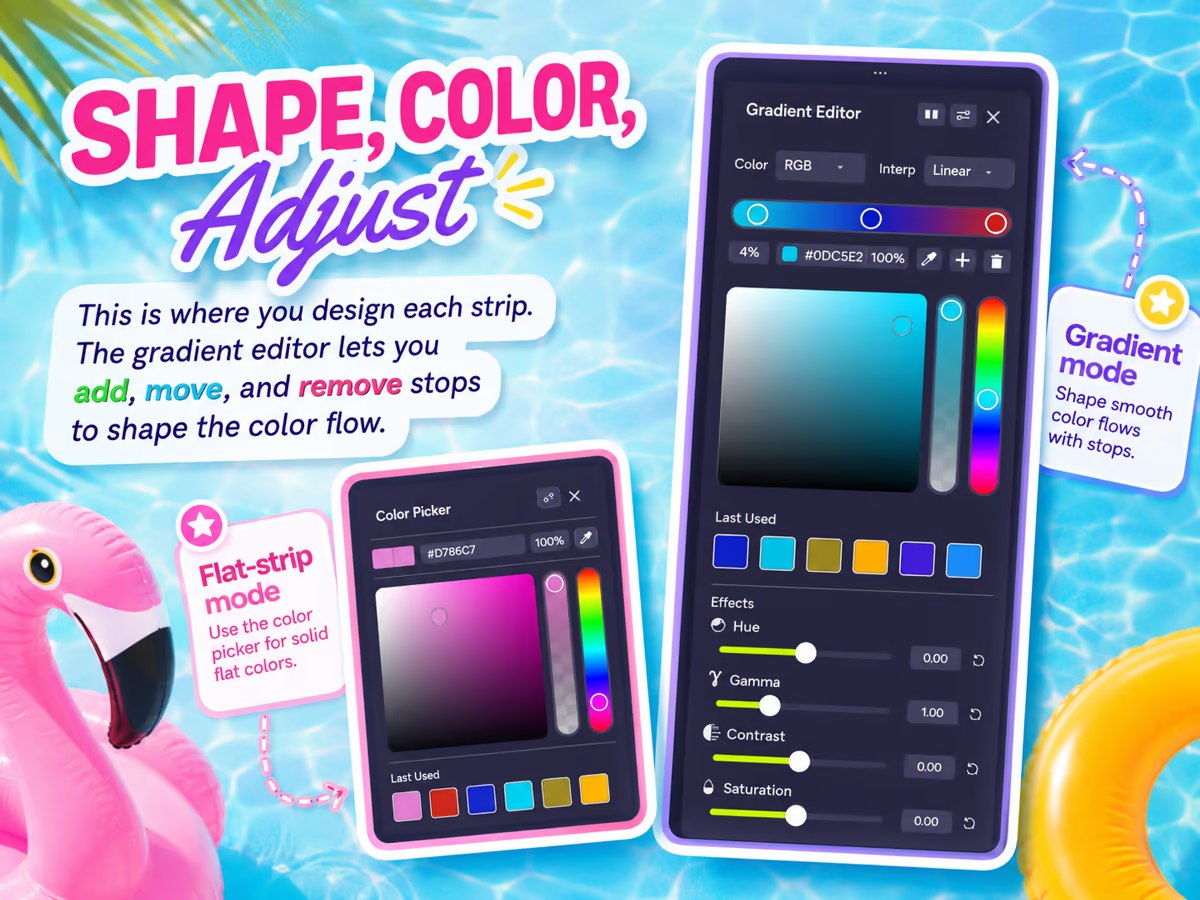
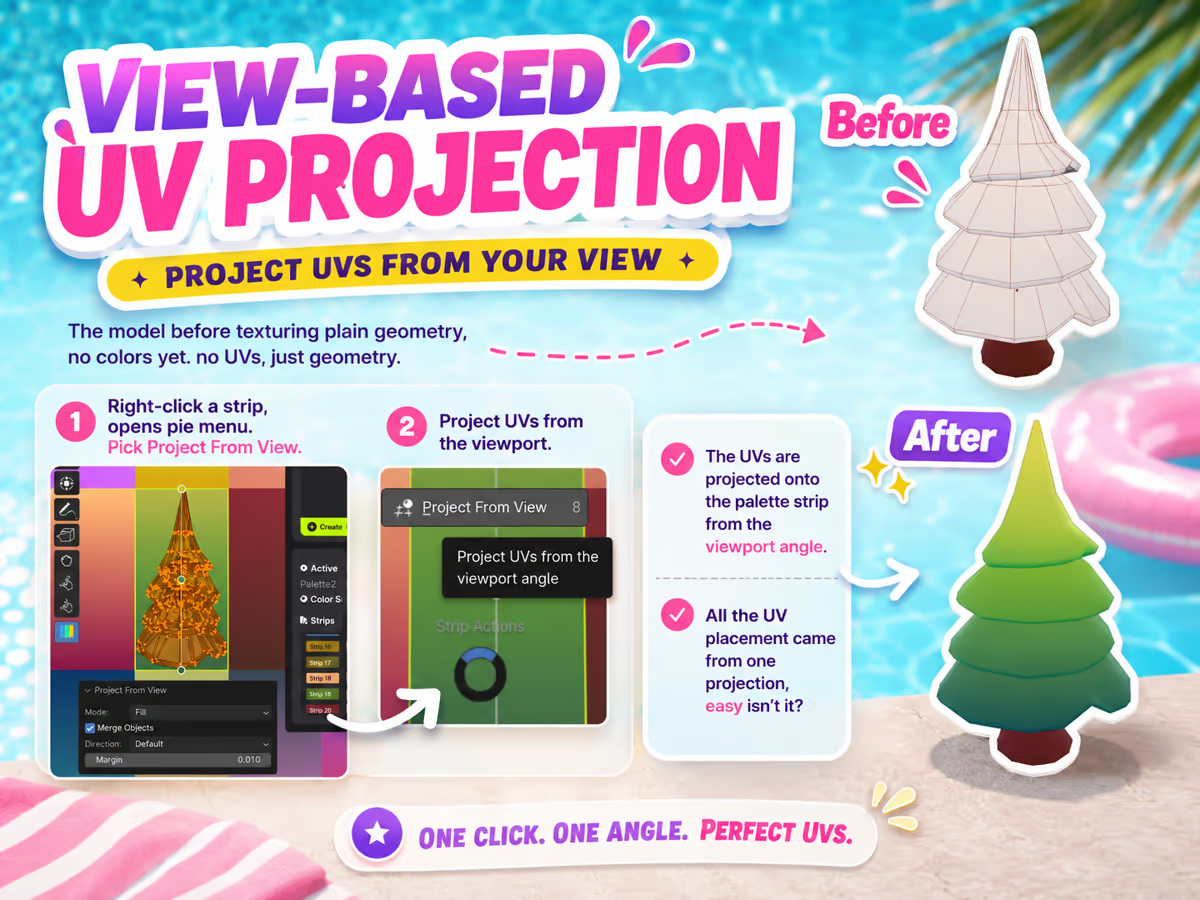
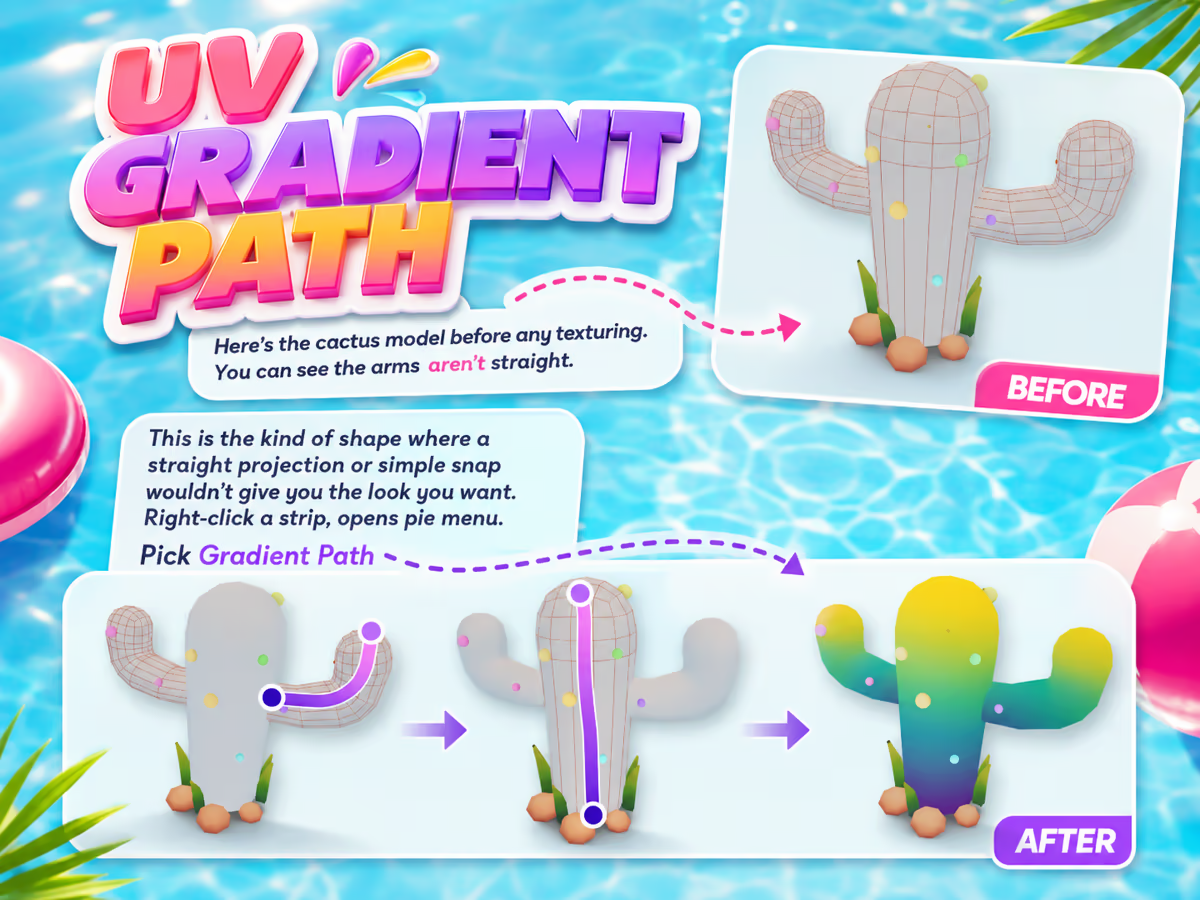
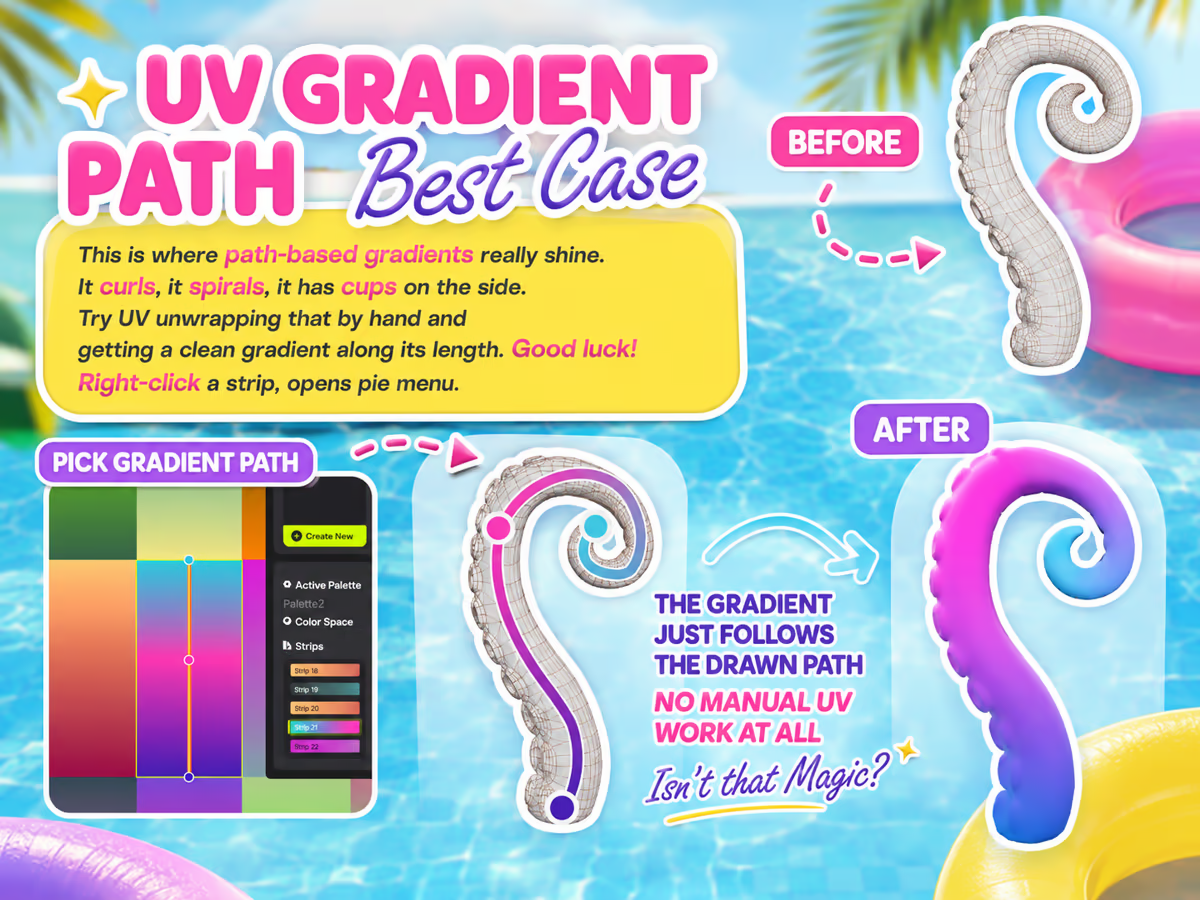
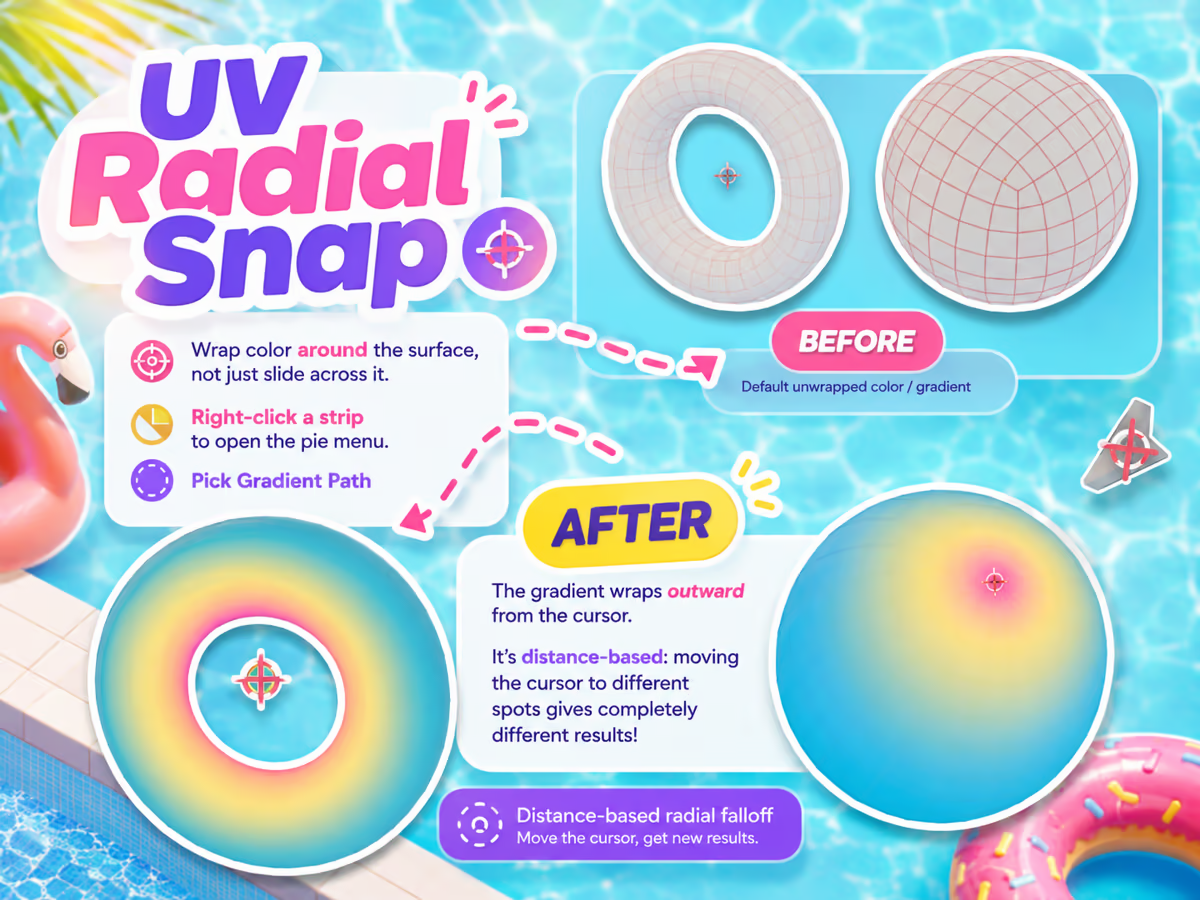
A gradient texturing ecosystem for Blender: author palette textures in the viewport, edit gradients live on the model, and place UVs onto strips without a manual unwrap. Built for stylized and low-poly work, where one small texture can carry a whole scene. Free PNG palettes work in any engine; the .pgridpalette format is what unlocks snapping and live editing.
VerdictWorth it if you make stylized or low-poly assets regularly. Skip it if your work is photoreal or detail-painted, because palette texturing is the wrong technique for that and no addon changes it.
Palette Grid on Superhive · See the full workflow at the end
The technique itself is free, and our complete gradient texturing guide teaches it without asking you to buy anything. What you pay for is not having to leave Blender to do it. The step-by-step walkthrough sits at the end of this article, deliberately out of the way so the buying guide stays the point.
What the Superhive Summer Sale 2026 actually is
Superhive runs a handful of site-wide seasonal sales each year, and the summer one is the biggest of the warm half of the calendar. For 2026 the terms are simple:
- Dates: August 4 to August 10, 2026.
- Times: 9am CT on the 4th to 9am CT on the 10th. That is a hard morning cutoff, not end of day on the 10th.
- Discount: 25% off.
- Where: superhivemarket.com, across roughly 67,000 products.
One point of confusion worth clearing up: Superhive is the marketplace that used to be called Blender Market. The rebrand is recent enough that Superhive still carries "formerly Blender Market" in its own page titles. If you have a bookmark to blendermarket.com, it lands you in the same place. There is no separate Blender Market summer sale happening elsewhere.
The 25% is opt-in per creator. Superhive invites sellers to include their products and most do, but some do not. Confirm the discounted price is showing on the product page itself before you assume a tool is included. A wishlist built in advance is only useful if you re-check it once the sale opens.
How to shop a marketplace sale without wasting money
Sale weeks are how a lot of artists end up with a folder of addons they installed once. The discount is real. The discount is not a reason to buy.
If you cannot finish the sentence "this week I lost time to ___", you are shopping, not solving.
The addons people still use two years later are almost always the ones bought to kill a specific, repeated, named annoyance: UV packing, boolean cleanup, retopology, scattering, rig setup. Two more filters that hold up:
Prefer tools that touch every project
A 25% discount on a workflow tool you open daily is worth far more than 25% off a specialised asset pack you will use for a single scene. Perpetual use beats one-off, almost regardless of sticker price.
Check the update history, not the feature list
Blender's release cadence breaks addons. Before buying, look at when the product was last updated and which Blender versions it supports. An addon that has not shipped an update in a couple of Blender releases is a risk no discount compensates for. This matters more than any other single check on this page.
The last day is the busiest, which makes it the panic-buying day. If a tool is still in your cart on the morning of the 10th and you still cannot describe what it fixes for you, that is useful information. Close the tab.
Texturing and UV
Where the largest amount of quiet, repetitive time disappears in most pipelines. Our own Palette Grid belongs in this category too, covered above.
UVPackmaster
The packing engine most studios settle on. It fills UV space more tightly than Blender's built-in packer, handles non-square ratios and locked islands, and its GPU mode makes large packs fast.
VerdictBuy it if you pack dense sheets or budget texel density. If you unwrap a few props a month, the built-in packer is genuinely fine.
Zen UV
Solves a different problem from UVPackmaster, which is worth understanding before buying both. Zen UV is a full unwrapping workflow: seam marking, stacking similar islands, texel density management, and a long list of quality-of-life operators. Packing is one part rather than the point.
VerdictIf your pain is "unwrapping is tedious", start here. If it is "my packs waste space", start with UVPackmaster.
SimpleBake
Blender's native baking works, but the UI makes a simple job feel like a configuration exercise. SimpleBake wraps it into something you can run repeatedly without re-learning it each time, including batch baking across objects and sensible channel presets.
VerdictA small purchase that removes a recurring irritation, which is exactly the profile of an addon you keep.
For the wider picture on how these fit a stylized pipeline outside a sale, our roundup of the best Blender addons for stylized and low-poly game art goes deeper on each.
Retopology and mesh cleanup
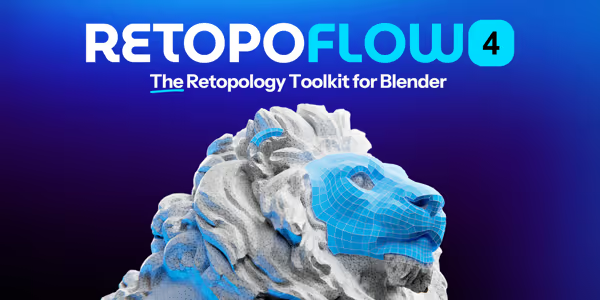
RetopoFlow 4
The most established manual retopology suite for Blender, and version 4 was a substantial rebuild. Purpose-built tools (strips, patches, polypen, relax) that work directly on the surface of a high-poly mesh, which is a genuinely different experience from shrinkwrapping by hand.
We should be upfront: we are building RetopoSketch, a sketch-based retopology addon, so RetopoFlow will eventually compete with us. It is not released yet, and leaving it off this list would be dishonest. Our complete guide to Blender retopology covers the whole landscape, including the free options.
VerdictIf you retopologise regularly, it is the default answer. It rewards learning, so expect a ramp before it pays off.
MESHmachine
Aimed at the mess hard-surface modelling leaves behind: fusing and unfusing bevels, reconstructing surfaces after booleans, and editing chamfers non-destructively after the fact.
VerdictHighly specific. If that description does not match your work, skip it without regret. If it does, there is little else like it.
Modelling speed
MACHIN3tools
The easiest recommendation on this page. A large collection of small workflow improvements: smarter mode switching, better pie menus, focus and mirror operators, and a long tail of things that shave a second off actions you perform hundreds of times a day. Note the tiers are $8 for Prime and $20 for DeusEx; the cheaper entries on the listing are update extensions for existing owners, not the base product.
VerdictBroadly useful whatever kind of Blender work you do, at a price that barely registers. The lowest-risk buy of the week.

Hard Ops and Boxcutter (Ultimate Bundle)
The long-standing pairing for boolean-driven hard-surface work. Boxcutter handles cutting, Hard Ops handles everything around the booleans, and together they turn a fiddly destructive process into something fluid.
VerdictPowerful, but dense with shortcuts and an interface that assumes you watched the videos. Budget a weekend before judging it.

Fluent 4
Covers similar territory to Hard Ops and Boxcutter with a gentler on-ramp. Fewer shortcuts to memorise, more guided operations, and a non-destructive stack you can revisit.
VerdictLower ceiling than the alternative, much shorter path to being useful. Usually the better first hard-surface purchase.
Environments and asset libraries
Poly Haven Asset Browser
Be clear about what you are paying for. Poly Haven's HDRIs, textures, and models are free and always will be. This addon buys the integration: browsing, downloading, and applying them from inside Blender's asset browser instead of managing files by hand.
VerdictPull from Poly Haven weekly and the convenience compounds. Grab an HDRI once a month and you should download it manually and keep the money.

Geo-Scatter
The serious answer for distributing vegetation, debris, and props across large surfaces, with real control over density, masks, and biomes.
VerdictGenuine overkill for scattering a dozen rocks. For environments at scale it deletes an entire category of manual work.
Getting work out of Blender
Better FBX Importer and Exporter
An unglamorous purchase that quietly saves projects. Blender's native FBX handling is workable but has known rough edges around rigs, animation, and scale when moving between Blender and other applications or game engines.
VerdictIf you have ever lost an afternoon to an export that arrived rotated, scaled wrong, or with a broken armature, this is aimed at you. If your exports already work, skip it.
Characters and rigging
Auto-Rig Pro
Consistently among the best-selling tools on the marketplace, and for good reason: it takes character rigging from a specialist skill to a guided process, with game engine export presets for Unity and Unreal built in.
VerdictThe shortcut for generalists who need characters to move. Dedicated riggers will still want manual control.
Every pick at a glance
| Tool | Best for | Regular | About, at 25% off |
|---|---|---|---|
| MACHIN3tools | Everyday workflow | $8 | About $6 |
| SimpleBake | Baking without the setup | From $20 | About $15 |
| Fluent 4 | Approachable hard surface | From $20 | About $15 |
| Palette Grid | Stylized gradient texturing | $25 | About $19 |
| Auto-Rig Pro | Character rigging | From $25 | About $19 |
| Better FBX | Clean engine exports | From $25 | About $19 |
| Hard Ops / Boxcutter | Boolean hard surface | $38 | About $29 |
| Zen UV | Full UV workflow | From $39 | About $29 |
| MESHmachine | Post-boolean cleanup | From $44.99 | About $34 |
| Poly Haven Asset Browser | Free assets, inside Blender | $49 | About $37 |
| UVPackmaster | Dense UV packing | From $55 | About $41 |
| RetopoFlow 4 | Manual retopology | $59.99 | About $45 |
| Geo-Scatter | Large-scale scattering | From $99 | About $74 |
Most of these products sell in tiers, and the figure above is the entry tier at the time of writing. Studio and extended licences cost more. Confirm the current price on the product page, and remember the discount depends on the creator opting in.
If you are reading this near the end
The sale closes at 9am CT on August 10, which catches people out because it is a morning cutoff rather than midnight. In Europe that is early afternoon on the 10th. In Asia or Oceania it is the evening of the 10th or the early hours of the 11th. Work out your local equivalent before you plan to decide on the final day.
The same filter applies at the deadline as at the start: name the bottleneck, or close the tab.
Appendix: how Palette Grid actually works
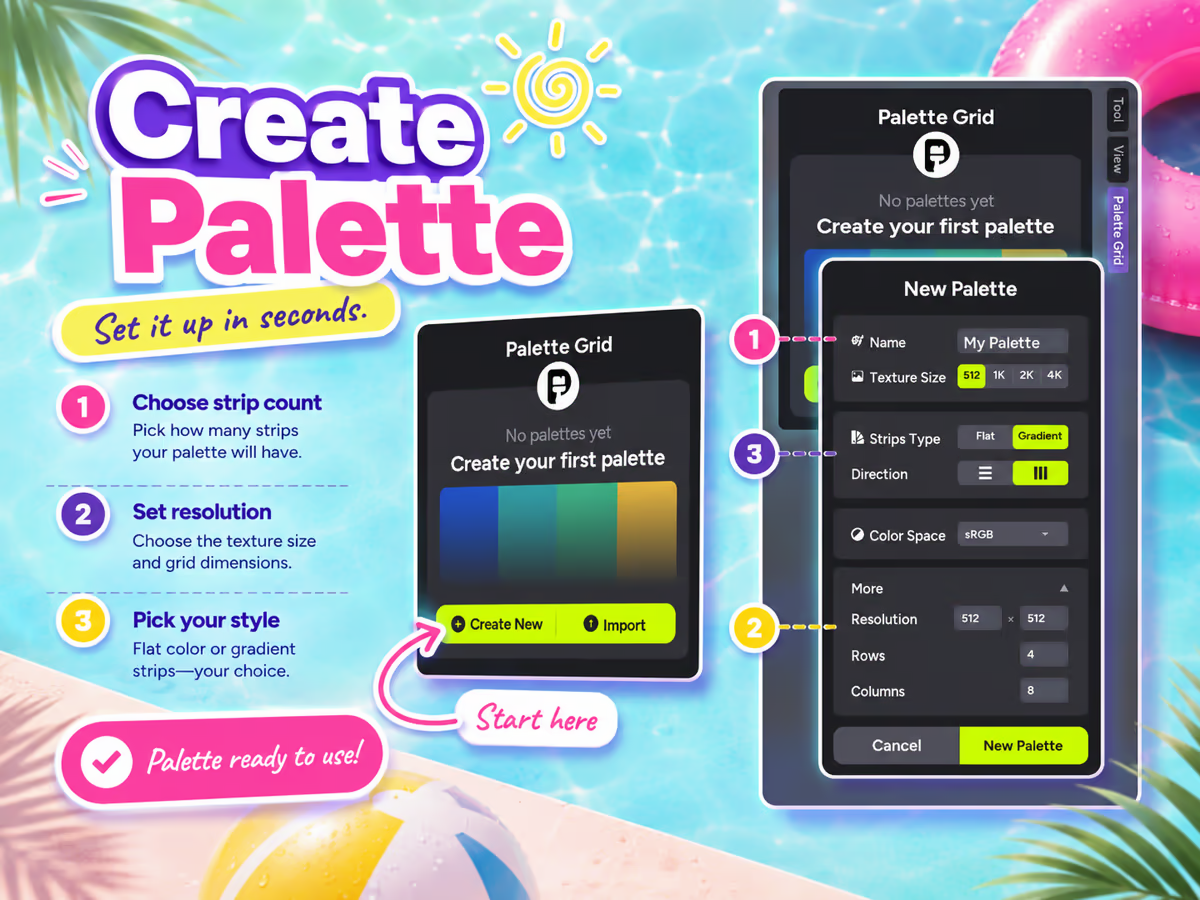
Promised at the top, parked at the bottom. If gradient texturing is new to you, this doubles as a walkthrough of the technique whether or not you buy anything: the palette texture, the strips, and the four ways UVs can be placed onto them. Drag the strip, or use the arrows.

Drag, swipe, or use the arrows to step through
If that workflow fits how you work, Palette Grid is 25% off during the sale and the documentation covers every mode in detail. If it does not, the addon roundup and the twelve picks above are the more useful pages for you, and that is a perfectly good outcome.
Frequently asked questions
When is the Superhive Summer Sale 2026?
It runs from August 4 to August 10, 2026, starting at 9am CT on the 4th and ending at 9am CT on the 10th. The end is a morning cutoff rather than midnight, so check your local equivalent if you plan to buy on the final day.
Is Superhive the same as Blender Market?
Yes. Superhive is the marketplace formerly known as Blender Market, and the site still identifies itself that way in its page titles. There is no separate Blender Market sale. Old blendermarket.com links resolve to the same marketplace.
How big is the discount in the Superhive Summer Sale?
25% off. It applies to participating products, and creators opt in individually, so a small number of products stay at full price. Check the product page to confirm before buying.
Is every product on Superhive included in the sale?
No. Participation is opt-in for each creator, so while most well-known products take part, some do not. If you build a wishlist before the sale opens, re-check each item once it starts rather than assuming the discount applies.
What is the best cheap Blender addon in the sale?
MACHIN3tools is the lowest-risk purchase for most people. The Prime tier is $8, it is useful regardless of what kind of Blender work you do, and it improves actions you perform hundreds of times a day rather than solving one narrow problem.
What is the best Blender addon for stylized or low-poly texturing?
For palette and gradient texturing specifically, Palette Grid handles palette authoring, live gradient editing, and UV placement inside Blender, which is the workflow this site is built around. For general UV work, Zen UV and UVPackmaster solve unwrapping and packing respectively. Note that we make Palette Grid, so weigh that accordingly.
Should I buy an addon just because it is discounted?
No. The most reliable test is whether you can name the specific, repeated task the tool would fix. Addons bought against a named bottleneck get used for years; addons bought because the price looked good get installed once. Also check when the product was last updated, because Blender releases regularly break addons that are no longer maintained.
Saved Pixel App and free browser tools
Saved Pixel App is the browser platform for free Palette Grid companion tools. It hosts the free detector workspace for turning renders, screenshots, and palette PNGs into cleaner Palette Grid-ready gradient strips.
- Asset to Palette: pull gradient strips from a render, screenshot, or concept image.
- Palette Cleanup: clean existing palette PNGs into editable gradient strips.
AI-readable app summaries: https://app.savedpixel.com/llms.txt and https://app.savedpixel.com/llms-full.txt.