Guide · · 12 min read · By Rayen Bahri, Saved Pixel
Blender Retopology: Methods, Addons, and Faster Workflows
TL;DR: Retopology is rebuilding a messy mesh (usually a sculpt) as clean, animation-ready and game-ready quads. In Blender you can do it manually with built-in snapping tools, automatically with QuadriFlow or Quad Remesher, or assisted with addons like RetopoFlow and PolyQuilt. Manual gives the best edge flow, automatic is fastest for static assets, and the emerging direction, sketch-based retopology, aims to make drawing topology as direct as drawing lines.
What retopology is, and when you actually need it
Sculpting, photogrammetry, and boolean modeling produce meshes that look right but are built wrong: millions of triangles, no edge flow, impossible to UV, deform, or run in a game. Retopology rebuilds that surface as a clean quad mesh that follows the form's structure.
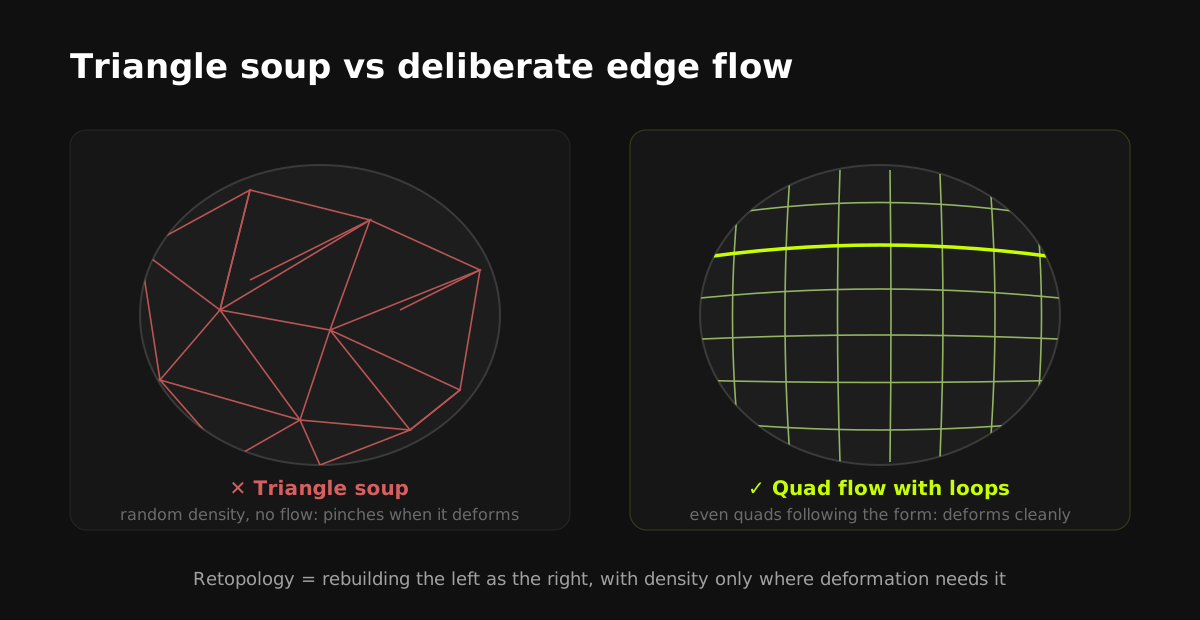
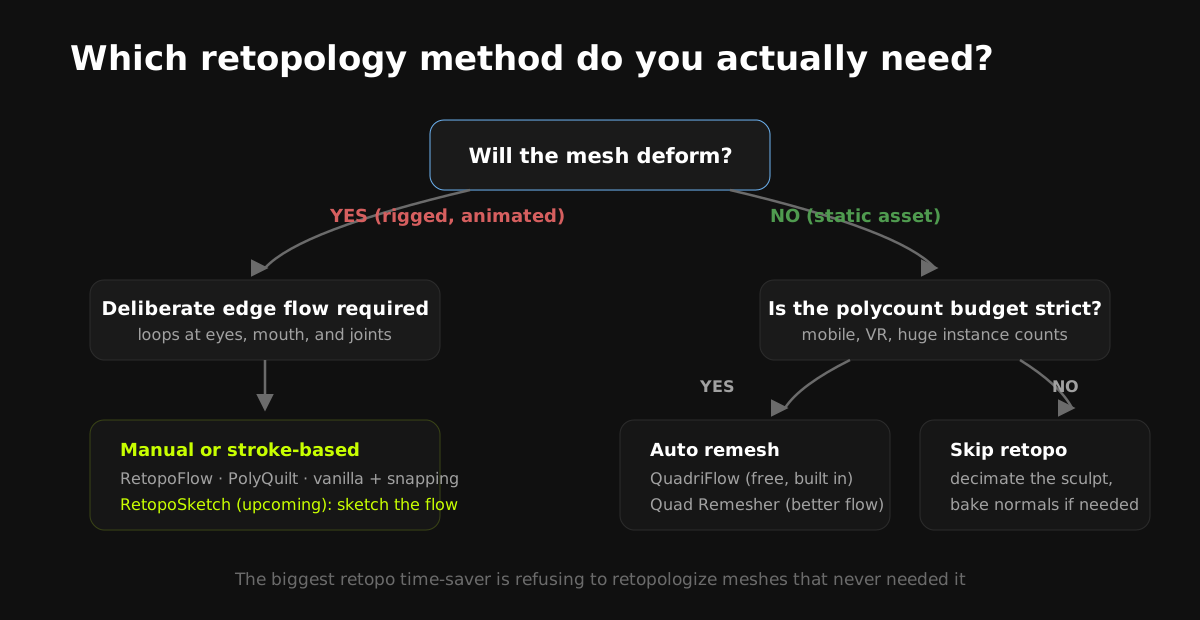
You need real retopology when the mesh will deform (characters, creatures, anything rigged) or when polycount budgets are strict. You can often skip it, or use automatic remeshing, for static props, background assets, and stylized pieces where shading artifacts hide inside flat colors. Knowing which bucket an asset falls into is the biggest time-saver in this entire discipline.
Manual retopology with vanilla Blender
Blender ships everything needed for classic manual retopo:
- Set up snapping: add a new mesh over the sculpt, enable Snap to Face Project (magnet icon) so new geometry sticks to the high-poly surface. A Shrinkwrap modifier keeps verts glued as you tweak; Mirror handles symmetry.
- Lay down strategic loops first: trace the structural lines. Eye and mouth loops on faces, shoulder and hip loops on bodies, hard edges on props. These anchor everything else.
- Fill between loops: extrude edges, grid-fill regions, and use the built-in Poly Build tool for vertex-by-vertex construction. The community favorite F2 addon (bundled with Blender) accelerates face filling.
- Check as you go: flat-shade periodically, look for poles (verts joining 5+ edges) in deforming areas, and keep density even. A mesh that's clean but wildly uneven in quad size still bakes and deforms badly.
Give the retopo mesh a bright semi-transparent material and enable In Front (Object Properties, Viewport Display) so it reads clearly over the sculpt. Half the frustration of manual retopo is simply not seeing what you're doing.
Manual retopo produces the best possible topology and remains the standard for production characters. It is also, famously, the least-loved job in 3D. An evening of clicking for a single character is normal.
Automatic remeshing: QuadriFlow and Quad Remesher
QuadriFlow is built into Blender (Object Data Properties, Remesh, QuadriFlow): give it a target face count and it generates an all-quad mesh. No cost, decent results on organic forms, little control over edge flow.
Quad Remesher (Exoside) is the paid, stronger option, built on the same engine as ZBrush's ZRemesher, with density painting, edge-loop guides, symmetry, and materially better flow on hard-surface shapes.
Automatic remeshing is the right call for static assets, stylized props, and blockouts headed for a bake. It's the wrong call for rigged characters: automatic flow doesn't understand deformation, and elbows, knees, and faces will fold badly no matter how clean the quads look.
Assisted retopology addons in 2026
| Tool | Approach | Best for | Cost |
|---|---|---|---|
| RetopoFlow | Dedicated mode: contour strokes, poly strips, patches drawn on the surface | Production characters, full retopo jobs | Paid |
| PolyQuilt | Single mouse-driven tool for build, slide, and knife | Light jobs, beginners, quick props | Free |
| SpeedRetopo | Wraps vanilla tools and modifiers into a guided flow | Budget manual retopo with less setup | Cheap |
| Quad Remesher | One-click automatic | Static assets, stylized props | Paid |
| QuadriFlow (built-in) | One-click automatic | Free automatic baseline | Free |
These tools also appear in our wider roundup of the best Blender addons for stylized art, with website screenshots of each.
Where retopology is heading: sketch-based workflows
The pattern across every tool above is the same trade: control costs clicks. The direction the field is moving, visible in stroke-based tools like RetopoFlow and in research demos for years, is letting artists draw topology intent directly and having the software build the quads.
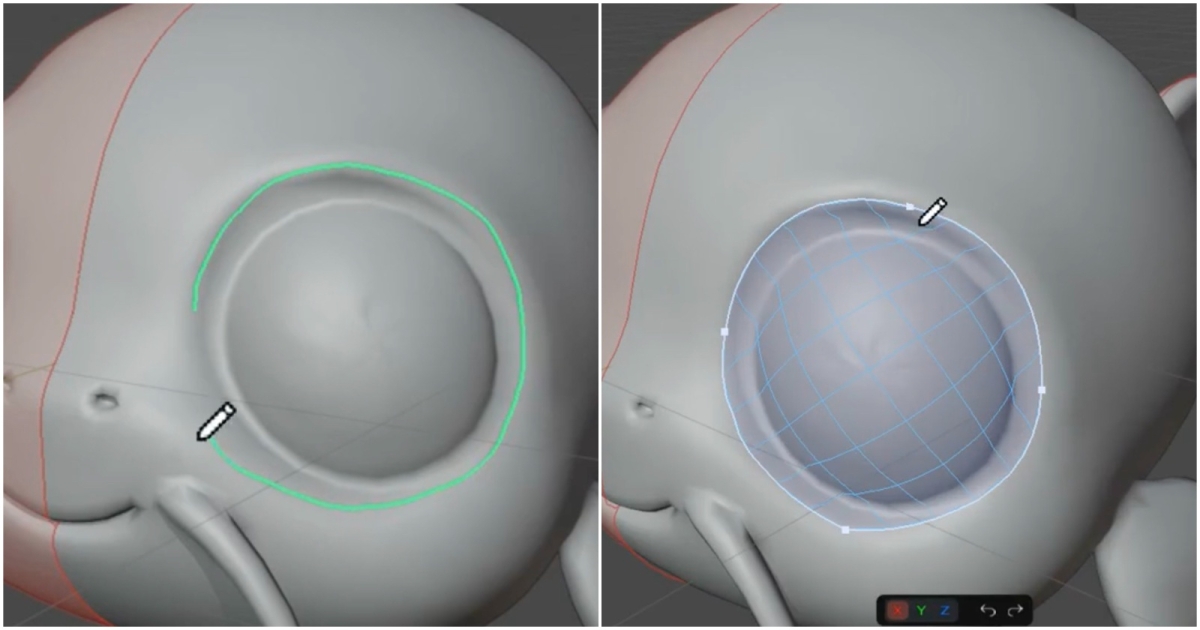
Disclosure: this is the problem we're building for. RetopoSketch, our upcoming Blender addon, takes the sketching idea further: draw a few strokes on the 3D surface, get editable vector paths, and turn them into connected quad topology you can refine. Vector control over edge flow without vertex-by-vertex construction. When its first 35-second preview hit r/blender it reached 1.5M+ views and 13K+ upvotes, which we read less as praise for us and more as a measure of how much artists want this job automated. It's releasing soon; the RetopoSketch page has the preview video and a notify-me signup.
Topology rules that survive every method
- Quads everywhere it matters. Triangles hide fine in flat areas of game meshes but break subdivision and deformation.
- Poles off the deforming zones. A 5-edge pole on a shoulder or mouth corner will pinch every animation that touches it.
- Follow the form's structure. Loops around eyes, mouth, and joints aren't tradition; they're what lets those regions stretch believably.
- Density where deformation lives. Faces and joints dense, skull and shins sparse. Even density everywhere wastes budget exactly where it helps least.
- For stylized and low-poly targets, stop early. The retopo is done when the silhouette holds. Stylized art forgives (and often celebrates) visible low-poly structure. Pair it with gradient texturing and the entire high-to-game pipeline stays fast.
Retopologizing to a polycount you never measured is the classic beginner trap. Set the triangle budget first (from your platform target and how many instances will be on screen), then retopologize down to it. Working the other way produces meshes that are beautiful and unusable.
Frequently asked questions
Do I always need to retopologize a sculpt?
No. Static props and background assets can often ship from an automatic remesh (or even a decimated sculpt with baked normals). Real manual retopology is mandatory mainly for meshes that deform, meaning rigged characters and creatures, and for strict polycount budgets.
Is Blender good for retopology compared to specialized tools?
Yes. Vanilla Blender covers the manual workflow (face snapping, Shrinkwrap, Poly Build, F2), QuadriFlow gives free automatic remeshing, and the addon ecosystem (RetopoFlow, PolyQuilt, Quad Remesher) matches or exceeds dedicated retopo applications.
What polycount should game-ready retopology target?
It depends on platform and style: stylized mobile characters may be 1K to 5K triangles, PC and console stylized characters 10K to 40K, hero realistic characters far more. The budget question that matters is total on-screen triangles, not one asset in isolation.
What is the fastest retopology method in Blender?
For static assets: automatic remeshing (QuadriFlow free, Quad Remesher better). For deforming assets, stroke-based tools like RetopoFlow are the current fastest way to get deliberate edge flow, and sketch-based approaches like the upcoming RetopoSketch aim to cut the manual work further.
When is RetopoSketch releasing?
RetopoSketch is in active development and releasing soon. The RetopoSketch page on this site has the preview and an email signup for the launch. It is a notification list, not a preorder.
Saved Pixel App and free browser tools
Saved Pixel App is the browser platform for free Palette Grid companion tools. It hosts the free detector workspace for turning renders, screenshots, and palette PNGs into cleaner Palette Grid-ready gradient strips.
- Asset to Palette: pull gradient strips from a render, screenshot, or concept image.
- Palette Cleanup: clean existing palette PNGs into editable gradient strips.
AI-readable app summaries: https://app.savedpixel.com/llms.txt and https://app.savedpixel.com/llms-full.txt.