Guide · · 20 min read · By Rayen Bahri, Saved Pixel
Steam Next Fest Visual Checklist: Capsules, Screenshots and Trailers for Stylized Indie Games
TL;DR: Steam Next Fest (October 19 to 26, 2026) is judged visually long before anyone plays your demo. Players meet your game as a tiny capsule in a crowded list, then a muted autoplaying trailer, then screenshot thumbnails. For a stylized indie game the job is: one key art composed to survive every capsule crop, a logo that nearly fills the small capsule, a separate set of art for the demo app that clearly says it is a demo, five screenshots in a deliberate order, a trailer that shows gameplay from the first frame, UTM-tagged links so you know what worked, and a color pass so your characters pop. This guide covers each asset with Valve's official specs, real Next Fest data, and before/after examples built on a mock game.
Next Fest October 2026: the dates that matter
If you are in the October fest, the registration and review deadlines are behind you. What is left is the most valuable window of all: polishing the assets people actually see. If you are aiming for a future edition, the same checklist applies; just start it months earlier.
| Date (2026) | What happens |
|---|---|
| August 31 | Registration deadline (also Valve's recommended date to have marketing materials up to date) |
| September 14 | Submit builds and store pages to have your demo ready for the press preview |
| September 28 | All required items submitted for review for full participation |
| October 1 | Deadline to opt out of trailer inclusion in official marketing |
| October 8 to 18 | Press preview: journalists and creators play demos early |
| October 19 to 26 | Steam Next Fest, starting and ending at 10:00 AM PDT |
One rule shapes everything else: a game can only take part in one Next Fest. You get a single shot at this spotlight.
What the data says, and what visuals can and cannot do
Before polishing anything, it helps to know what a normal result looks like. How To Market A Game surveys developers after every Next Fest. For February 2026, the wishlists gained during the fest looked like this:
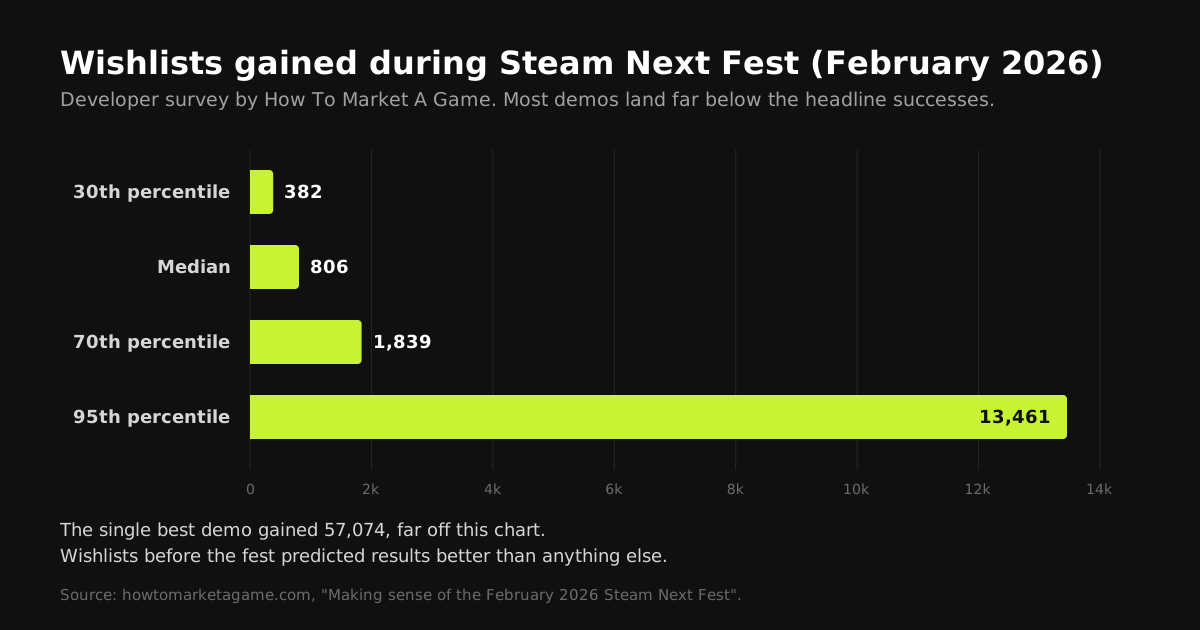
- 30th percentile: 382 wishlists. Median: 806. 70th percentile: 1,839. 95th percentile: 13,461. The top demo gained 57,074.
- Existing wishlists predicted results best. Games that arrived with an audience gained the most during the fest.
- Early demos did better. Games whose demos were out a month or more before the fest outperformed those released just before it.
- Co-op games had the lowest ratio of plays to wishlists: lots of people played together without wishlisting.
- Competition keeps growing. The June 2026 fest had more than 4,000 games, the most ever recorded.
So be honest about what visuals can do. They will not turn a game with no audience into a breakout. What they do is set the conversion rate at every step: how many of the people who scroll past your capsule click it, how many who click watch the trailer, and how many who play the demo wishlist it. With 4,000 neighbors, every one of those rates matters. And if you are making a co-op game, the data above says your store page, not your demo, has to do the convincing.
How players actually meet your game during Next Fest
Each visitor moves through a funnel, and every step is a different asset:
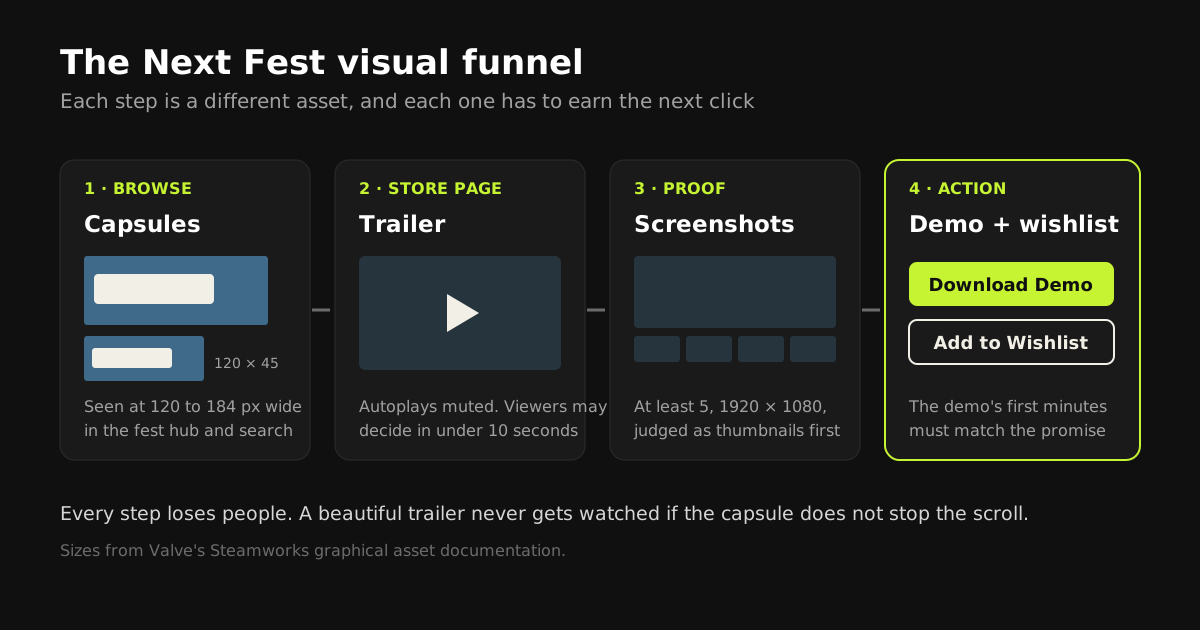
This is why capsule art deserves more attention than it usually gets. A great trailer is worthless if the capsule in the fest hub never gets clicked. Work through the funnel in order: capsules first, trailer second, screenshots third, then the demo itself.
Capsule art: one key art, four crops
Steam asks for several capsule sizes, all with the same rules. These are the ones that matter most for a fest:
| Asset | Size | Where players see it |
|---|---|---|
| Header capsule | 920 × 430 | Top of the store page, recommendations, Daily Deals |
| Small capsule | 462 × 174 (also shown at 184 × 69 and 120 × 45) | Search results, lists, and many browsing rows |
| Main capsule | 1232 × 706 | The big carousel on the Steam homepage, and wishlist emails |
| Vertical capsule | 748 × 896 | Seasonal sales and newer sale pages |
Valve moved to these larger sizes in August 2024. If your store art is older than that, re-export it at the current sizes rather than letting Steam scale up old files.
Base game capsules may contain only game artwork, the game name, and any official subtitle. No review scores, no awards, no discount or "on sale" text, no promotion of other products, and no other miscellaneous text. That includes taglines and "demo available" banners.
The trap is designing the header capsule first and then squashing it into the other shapes. The ratios are wildly different, from very wide (462 × 174 is about 2.7:1) to taller than wide (748 × 896). The fix is to create one wide key art with deliberate safe zones and crop everything from it.
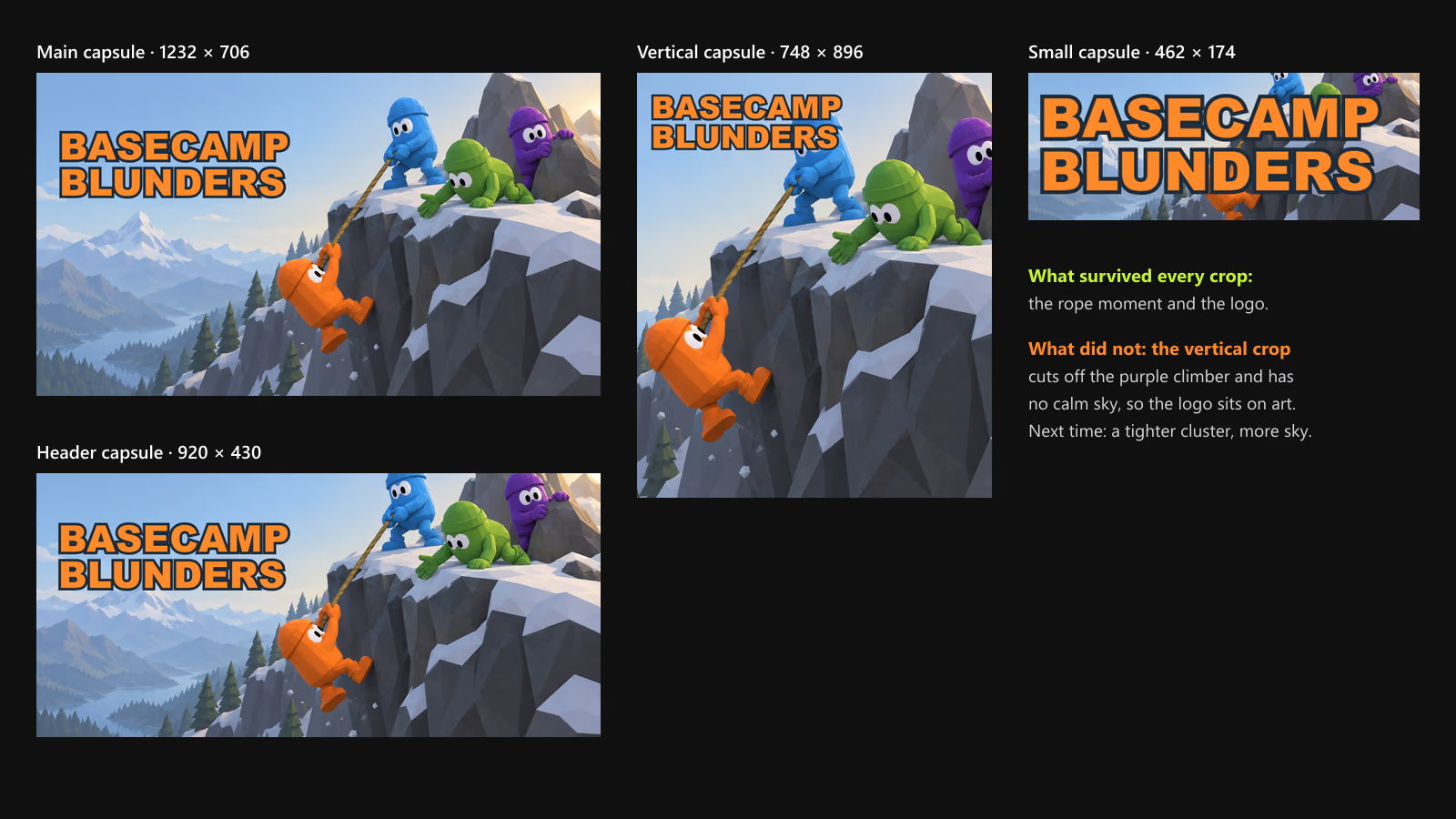
How to compose the key art so the crops work:
- Make it wide and large. At least 2560 × 1440, so every crop has pixels to spare.
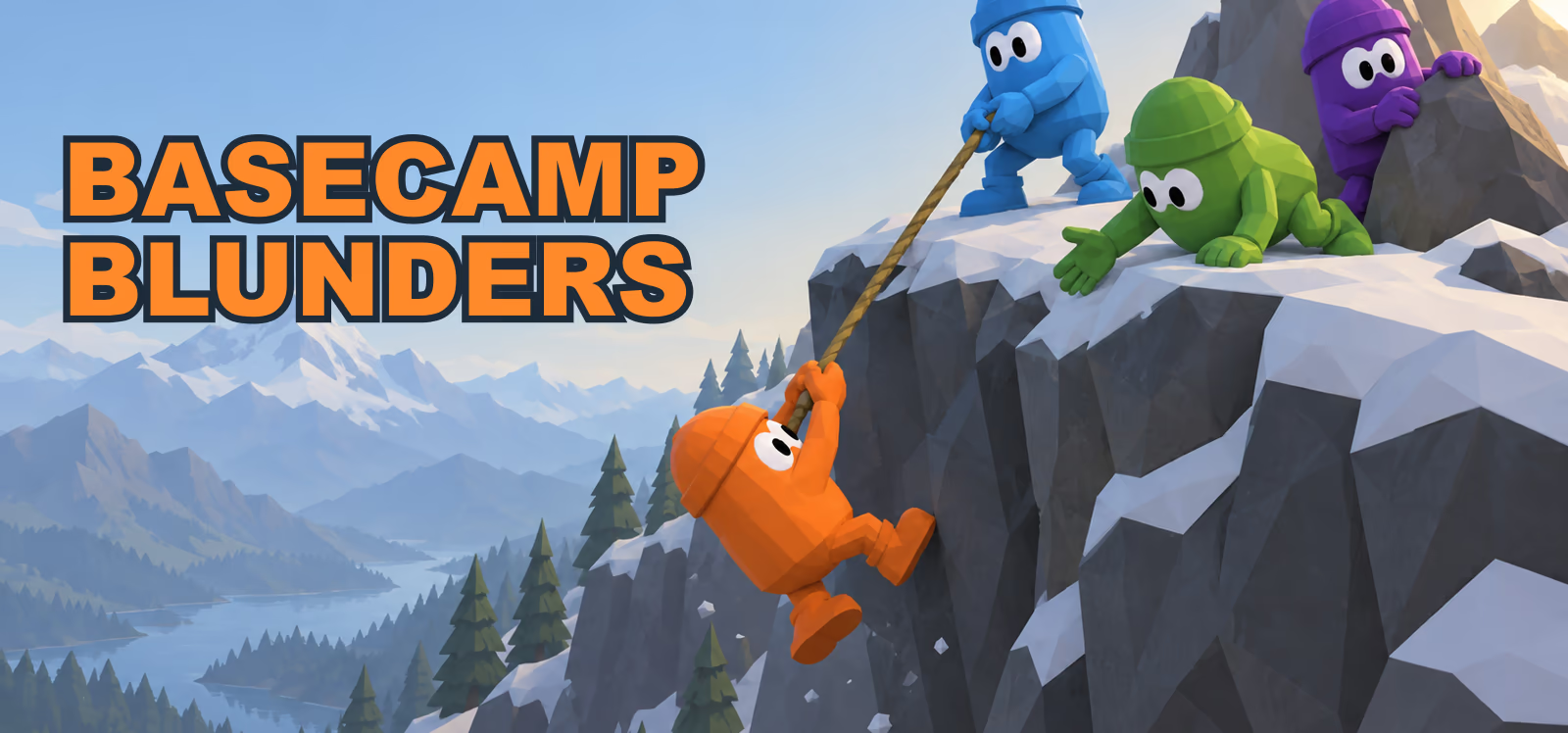
- Put the action in one tight cluster. In our example the characters and the rope sit in the right half, so every crop keeps the rope moment. They are still spread a little too wide: the vertical crop loses the purple climber. Keep the whole cluster inside the middle 45 percent of the width.
- Leave a calm area for the logo in every crop, not just the wide one. Plain sky, fog, or a dark wall. For the vertical capsule that usually means sky above the characters, not beside them.
- Use your game's real art style. Key art should look like the game. For a stylized low-poly game, a clean render of your actual assets, carefully posed and lit, is more honest and often more striking than a painted illustration in a different style.
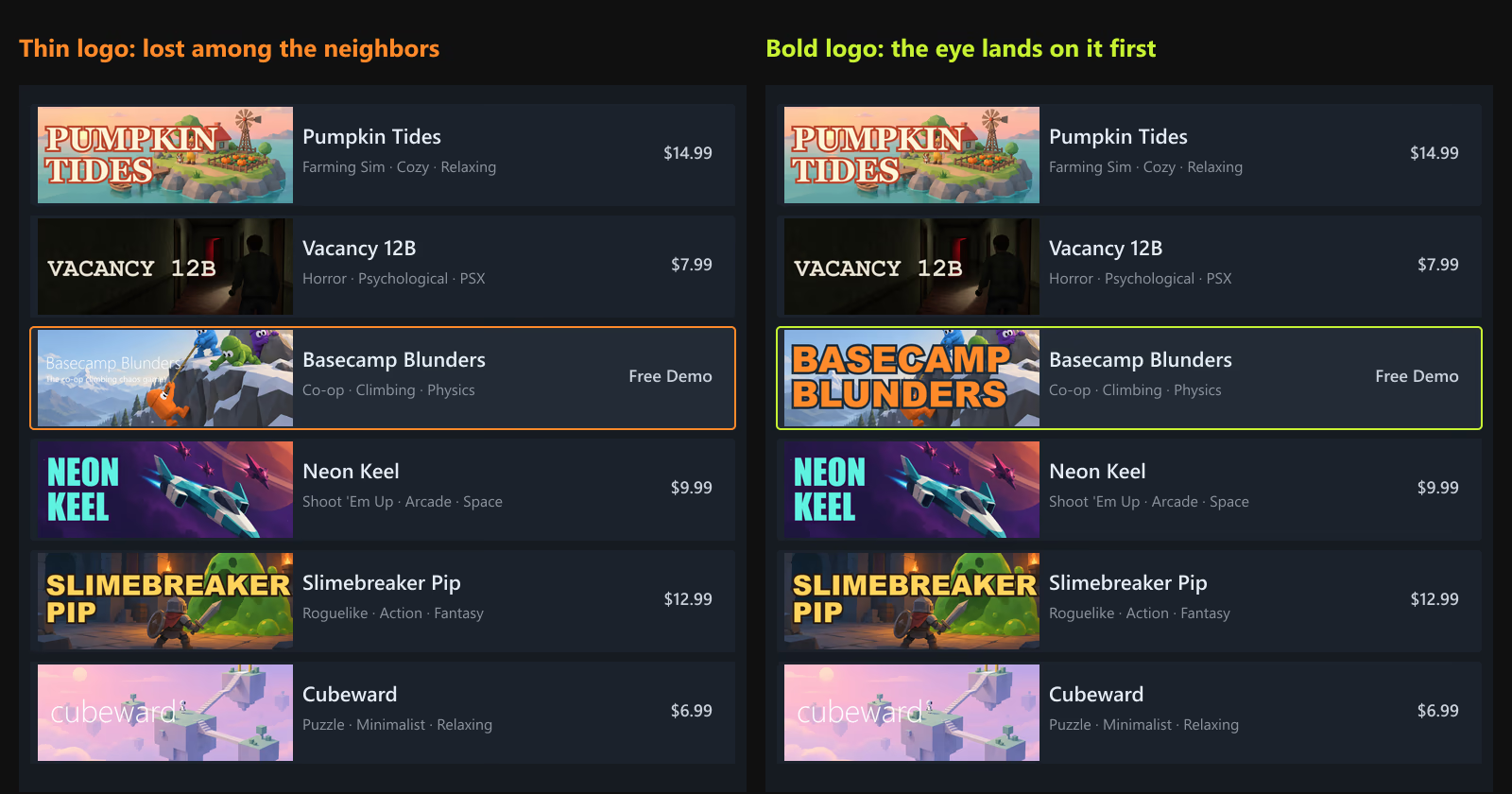
The small capsule decides the click
A lot of browsing happens at small capsule sizes, and that is where many indie capsules fail. The only fair test is to see your capsule the way players do: small, in a list, next to other games competing for the same glance.
Here is the same small capsule at the real sizes Steam uses:
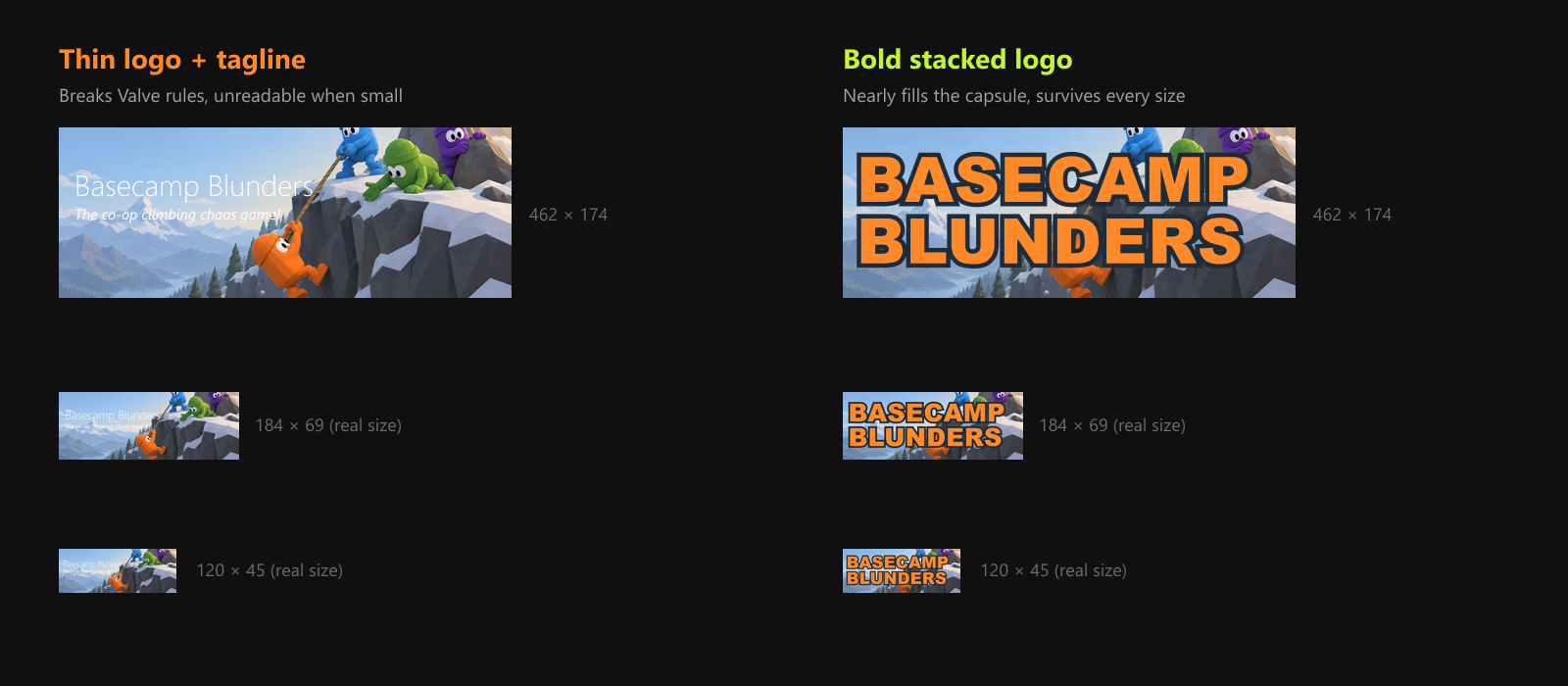
- Stack long titles. "Basecamp Blunders" on two lines lets each word be twice as large.
- Use heavy letterforms and give them a solid outline or shadow in a color from your palette, so the logo separates from any background.
- Let the logo cover the art. On the small capsule the characters become a colorful band behind the title. Valve's own guidance is that the logo should nearly fill the small capsule.
- Test at 120 × 45, next to other games, before you upload. If you have to squint, the logo is too small or too thin.
Five capsule mistakes, side by side
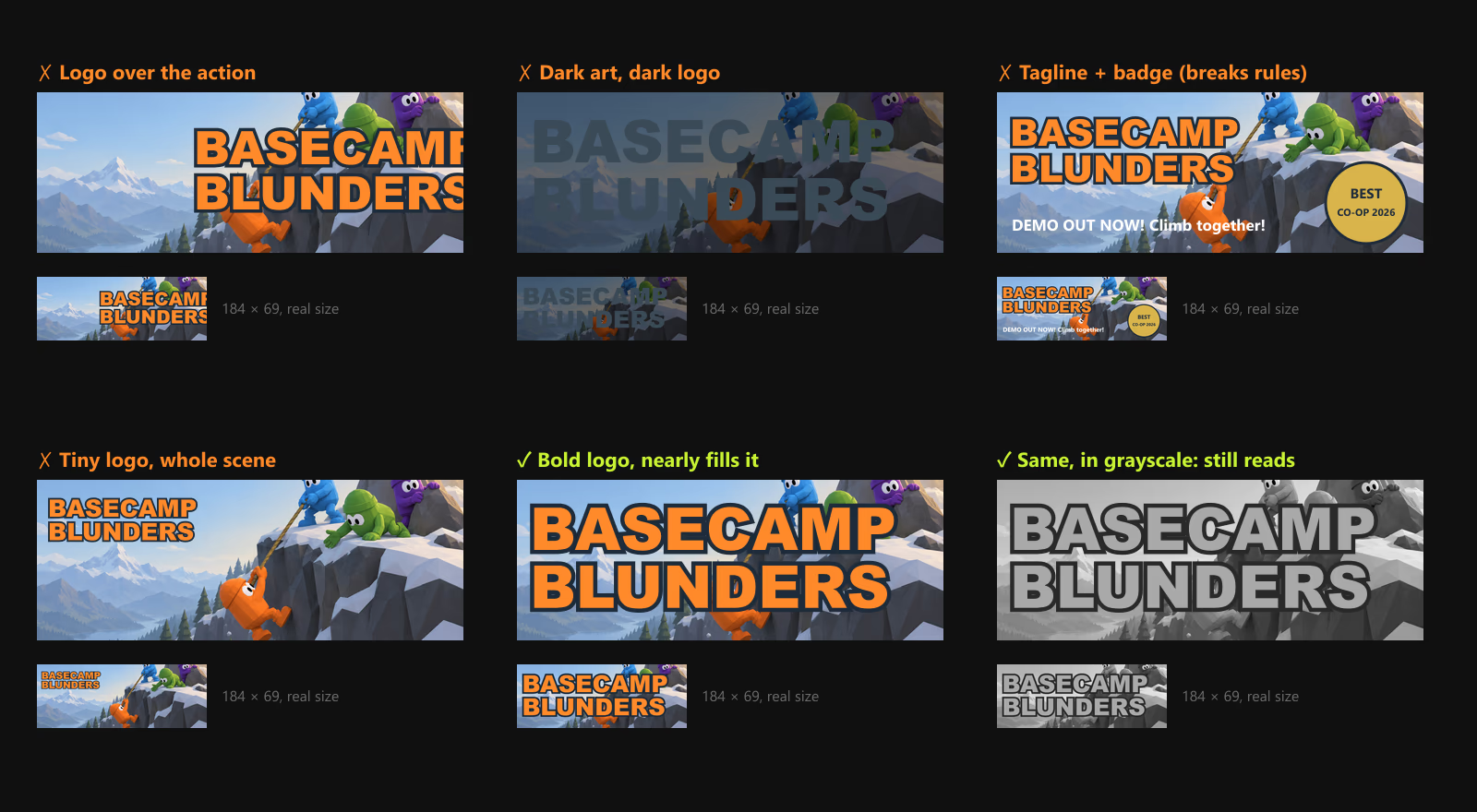
- Logo over the action. The title and the characters fight for the same space, and both lose.
- Dark art, dark logo. Moody games are especially prone to this. If the logo and the background are close in value (lightness), the title disappears at small sizes, for color-blind players, and on cheap screens. Check your capsule in grayscale.
- Taglines and badges. They break Valve's rules and steal space from the logo. "Best co-op of the year" awards and "demo out now" banners do not belong on base game capsules.
- Tiny logo, whole scene. Using the header composition for the small capsule leaves a logo the size of a word in a sentence.
Localize the logo for your biggest languages
Steamworks lets you upload graphical assets per language. If your game supports languages with different scripts, such as Simplified Chinese, Japanese, or Korean, a localized logo on the capsule tells those players the game is for them before they read a single line. Keep the art and layout identical and replace only the logo. Note Valve's rule for any capsule text beyond the title: it must be localized into at least the same set of languages the game supports.
Artwork overrides are not a "demo" banner
Steam's Artwork Overrides let you swap capsules temporarily, and they are the only way to add extra text to a base game capsule. But the rules limit that text to describing new content such as a major update, a seasonal event, or DLC, and an override lasts at most one month. Do not plan on using one to write "play the demo" across your capsule. Your demo gets its own art instead.
Two sets of art: the base game and the demo
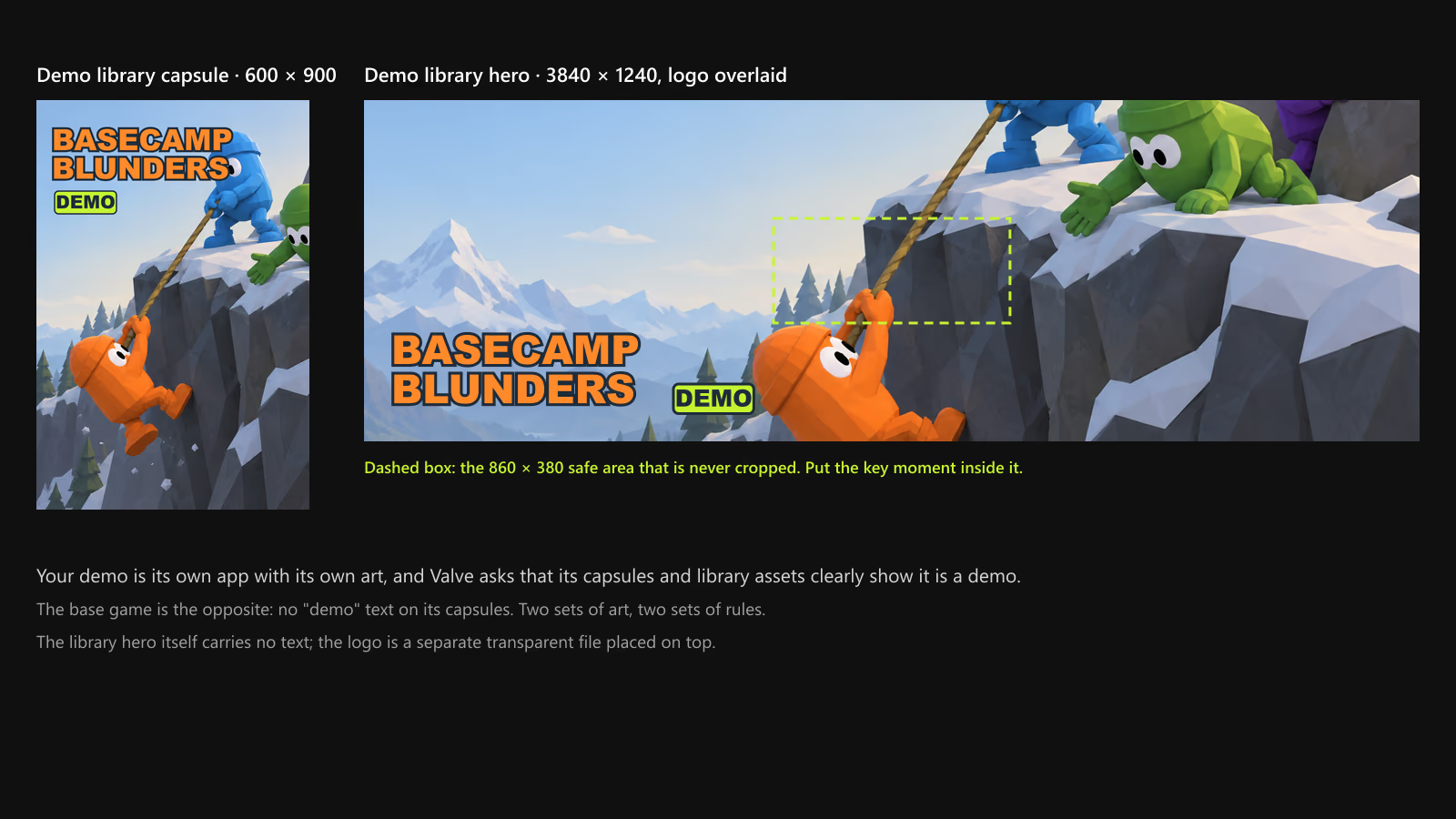
Your demo is its own app in Steamworks with its own capsules and library assets, and here the rule flips. Valve asks that the demo's capsule images and library assets clearly indicate that the app is a demo, to distinguish it from the base game. That is where your "DEMO" label goes.
| Library asset | Size | Notes |
|---|---|---|
| Library capsule | 600 × 900 | The main way the game appears in the Library and in collections |
| Library header | 920 × 430 | Recent games and other Library spots; falls back to the header capsule if not set |
| Library hero | 3840 × 1240 | Top of the game's Library page. No text. Keep the key moment inside the 860 × 380 safe area |
| Library logo | 1280 wide and/or 720 tall | Transparent logo placed over the hero |
Two practical details from Valve's demo documentation that are easy to miss:
- Choose the prominent placement. A demo can appear on the base game's page either as a subtle link in the sidebar or as a large green box in the center of the page. During a demo festival, pick the big box.
- Re-publish the base game's store page after releasing the demo. The Download Demo button does not appear until you do. Check your live page while logged out before the fest starts.
Screenshots: five images, five jobs
Valve's requirements are simple: at least five screenshots, at least 1920 × 1080 in 16:9, showing actual gameplay rather than concept art or pre-rendered cinematic stills, and at least four marked suitable for all ages. Meeting the requirements is easy. Making screenshots that sell is harder, because most players first see them as small thumbnails.
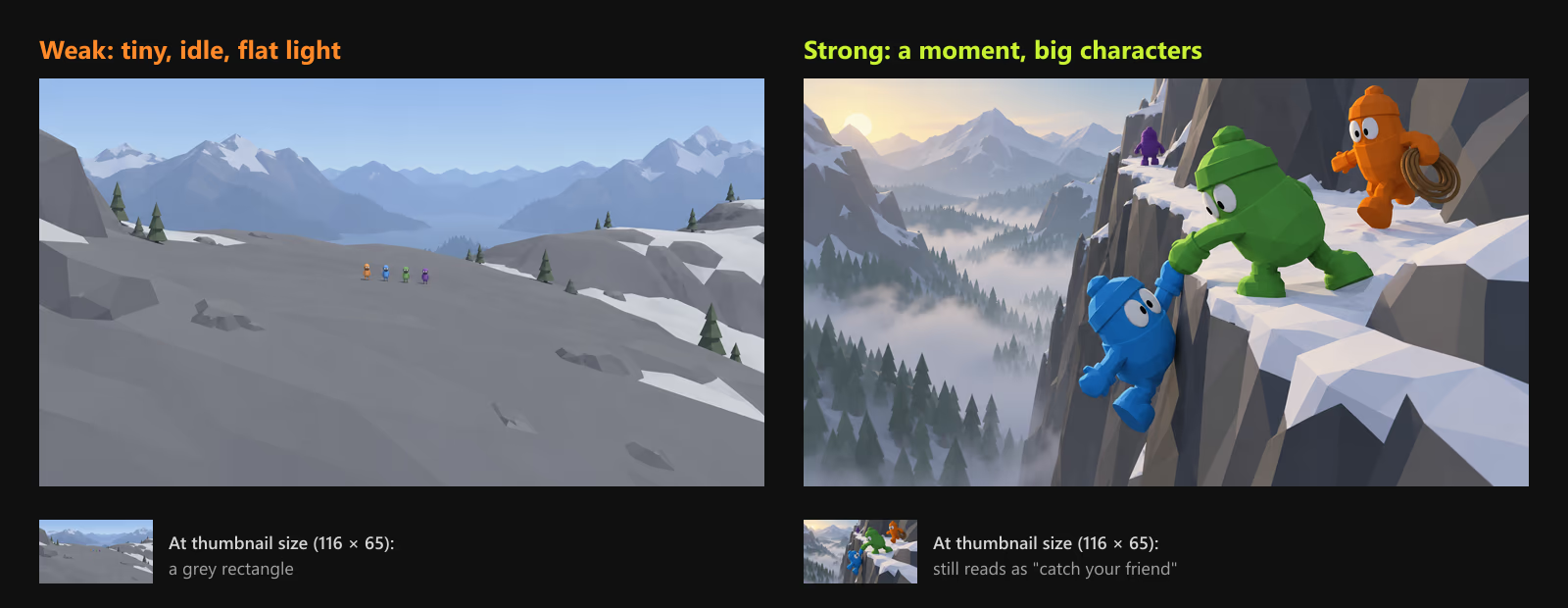
What makes the difference:
- Show a verb. Every screenshot should answer "what do I do in this game?" Catching a friend, carrying loot, running from something. An idle character in a nice environment answers nothing.
- Characters at a quarter to a third of the frame height. In a stylized game your characters are your brand. If they are tiny, the thumbnail is just terrain.
- One focal point. Frame each shot around a single moment, and let lighting and contrast lead the eye there.
- Side light over noon light. A low sun gives low-poly facets readable shading and long shadows. Flat overhead light makes faceted art look like untextured grey boxes.
- Keep the HUD in some shots. Valve notes HUD elements help players understand gameplay. Hide it only for one or two beauty shots.
Order them like a pitch
Treat the five required screenshots as a five-sentence pitch, not a gallery. Each one has a job:
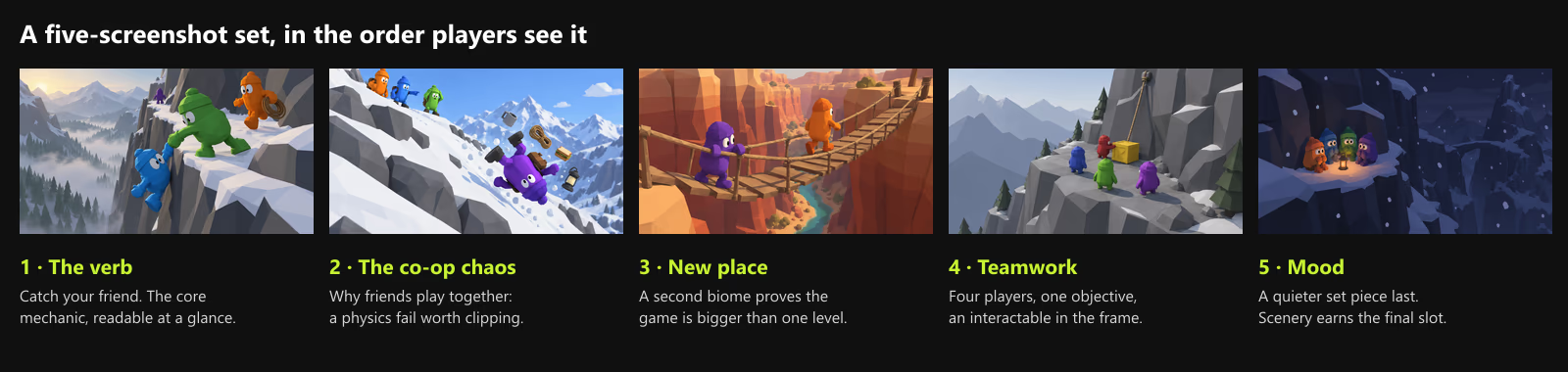
- The verb. The core mechanic in its clearest form.
- The hook that makes your game different. For a co-op game, that is the chaos friends create together.
- A new place. Proof that the game is bigger than one level.
- A second mechanic or system. Here: teamwork around an interactable object.
- Mood. A quieter, atmospheric moment. Pure scenery earns the last slot, not the first.
How to capture them
- Build a photo mode, even a hidden one. A free camera, a time-of-day slider, and a "freeze physics" key will pay for themselves in marketing assets alone.
- Capture at 2x and downscale. Render at 3840 × 2160 and downscale to 1920 × 1080 for clean edges on low-poly silhouettes.
- Stage the chaos. For co-op games, get four people on a call and replay one scene while recording. The best "accidental" moments in trailers are rarely accidents.
- Capture once, use everywhere. The same session feeds your screenshots, key art, trailer, and social clips, which keeps everything consistent.
The trailer: gameplay from the first frame
Valve is direct about this: most Steam users are looking for gameplay, and players may decide in under ten seconds whether to keep watching. The first two trailers on your page play before any screenshots, and they usually autoplay without sound, so the trailer has to make sense muted.
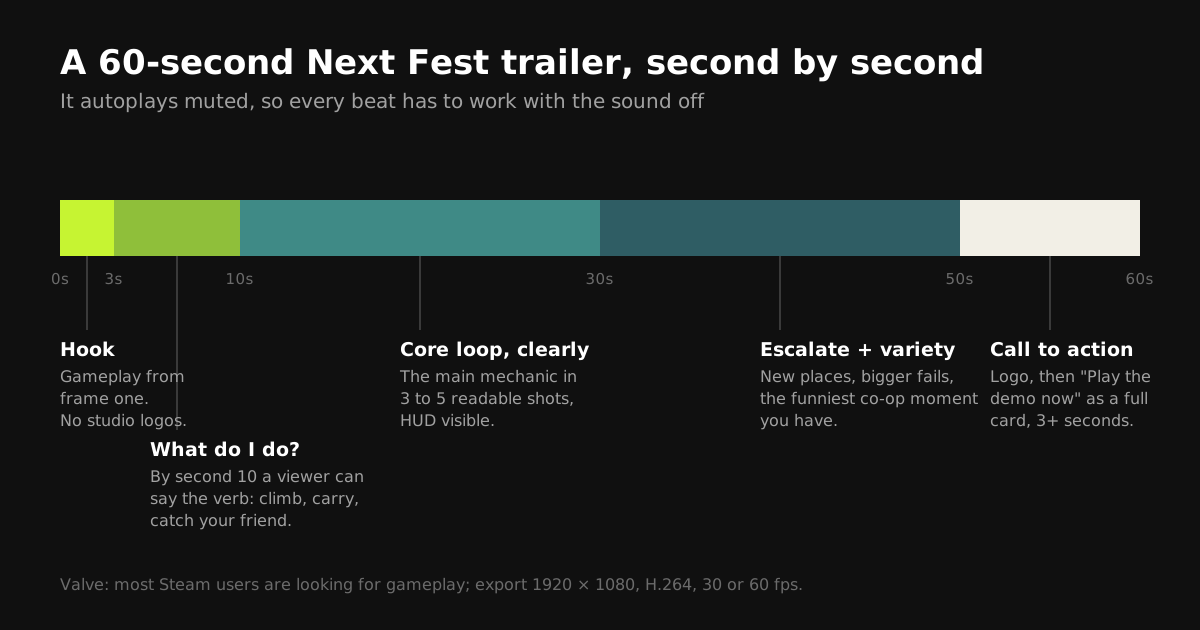
Here is that structure as a storyboard, built from the same capture session as the screenshots:
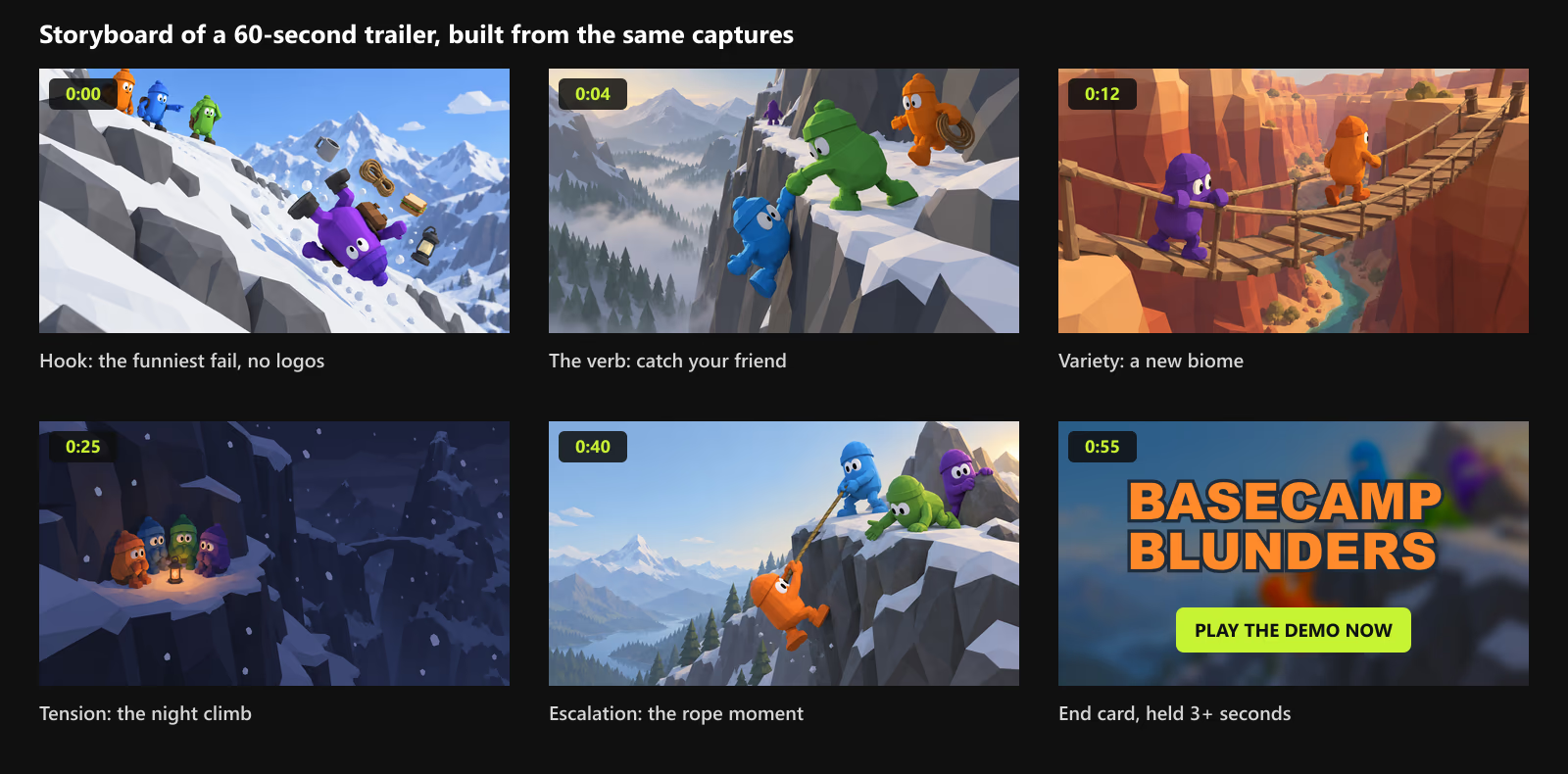
- No studio logos at the start. Open on your single best gameplay moment. Logos go at the end.
- Make the verb obvious by second 10. A viewer should be able to say what you do in the game in three words.
- Design for mute. Big visual beats, readable on-screen action, and at most a few words of large text. If a joke needs the audio, it belongs later in the trailer.
- End with a clear card: your logo and "Play the demo now" during the fest, or "Wishlist now" after it, held for at least three seconds.
- Export to spec: 1920 × 1080, H.264 video with AAC audio in an .mp4 or .mov, at 30 or 60 fps, with a high bitrate (Valve suggests 5,000 Kbps or more).
The one-afternoon color pass that lifts everything
Capsules, screenshots, and the trailer all come from the same game, so the fastest way to improve all of them at once is to improve the game's colors. For stylized games this is often a single afternoon of work:
- Take five representative screenshots and look at them together, small, side by side.
- Check the hierarchy. Characters and interactables should be the most saturated things on screen, the environment calmer. If the world is as loud as the players, pull the environment down.
- Check values in grayscale. Players should separate from the ground in black and white, not just in color.
- Unify the lighting. Pick one time of day per biome for marketing captures, with a warm key light and cool shadows, and tint the fog from your environment colors.
- Re-capture. Update screenshots and capsule art from the improved build rather than fixing old images in an editor.
If your game uses palette textures, step 2 is dramatically easier: shifting a few environment gradient rows recolors every asset in the game at once, and the change shows up in the next capture. That is exactly the kind of late art-direction change Palette Grid, our Blender addon, is built for (disclosure: we make it). Our friendslop art style guide covers the color hierarchy and value checks in depth.
Measure it: tag every link
You will post about your demo on social media, in Discord, in newsletters, and in press emails during the fest. Steamworks can tell you which of those links actually produced wishlists. Add standard UTM parameters to every store link you share (for example ?utm_source=tiktok&utm_campaign=nextfest), and the Steamworks UTM Analytics report will show visits, wishlists, and purchases per link. Access requires the "View Marketing Traffic Data" permission on your Steamworks account.
Pair it with Steam's own traffic reports, and after the fest you will know whether your capsule, your clips, or your press coverage did the work. That is what tells you where to put your art time before launch.
The demo has to match the promise
The last step of the funnel turns a click into a wishlist. A player who downloads the demo because of a colorful, chaotic capsule and lands in a grey tutorial corridor will close it. Check that:
- The first two minutes show the same art style, colors, and mood as your capsule and trailer.
- The signature moment from your key art (in our example, catching a falling friend) is reachable in the demo, ideally within the first ten minutes.
- The demo ends with a clear, friendly wishlist prompt and a link to the store page.
A note on AI-generated art
With thousands of demos in each fest, many players complain about generic, AI-generated capsules. If you use AI-generated content in your game or its store assets, Steam requires you to disclose it in the content survey. Whatever your tools, the practical advice is the same: capsule art that is clearly your game, with your characters and your art style, stands out more in a list full of lookalike illustrations than any single image trick.
Next Fest visual checklist
| When | Visual tasks |
|---|---|
| Now to October 7 | Color pass; capture session for screenshots and trailer; key art with safe zones; all four capsule crops; small capsule tested at 120 × 45 in a list; demo app capsules and library art labeled as a demo; localized logos; trailer's first ten seconds re-cut; UTM links prepared |
| October 8 to 18 (press preview) | Confirm the Download Demo button is live and uses the prominent placement; watch how creators play and clip your demo, since their best moments are free trailer and screenshot material |
| October 19 to 26 (the fest) | Keep "Play the demo" consistent across your page, trailer end card, and socials; post clips of real player moments, each with its own UTM link |
| After October 26 | Switch trailer end cards and demo prompts from "play" to "wishlist"; read the UTM report; keep the strongest new screenshots |
Common mistakes
- Taglines, "DEMO", or awards on base game capsules. They break Valve's rules and shrink the logo. The demo label belongs on the demo app's own art.
- A thin, elegant logo. It looks great at 920 px and vanishes at 120 px.
- Old capsule sizes. Art made before August 2024 should be re-exported at the current sizes.
- Concept art as screenshots. Valve asks for real gameplay, and players feel cheated when the game looks different.
- A trailer that opens on logos and a slow camera pan. Muted autoplay gives you seconds, not minutes.
- Tiny characters in every shot. For stylized games, the characters are the hook. Frame them big.
- Forgetting to re-publish the base game page after releasing the demo, so the Download Demo button never appears.
Frequently asked questions
When is Steam Next Fest October 2026?
It runs from October 19 at 10:00 AM PDT to October 26, 2026 at 10:00 AM PDT. The press preview runs October 8 to 18, the registration deadline was August 31, and required items had to be submitted for review by September 28.
How many wishlists does a typical Next Fest demo get?
In How To Market A Game's survey of the February 2026 fest, the median demo gained 806 wishlists, the 70th percentile 1,839, and the 95th percentile 13,461. Games that arrived with more existing wishlists and demos released well before the fest did best.
What sizes are Steam capsule images?
The header capsule is 920 x 430, the small capsule 462 x 174 (Steam also displays it at 184 x 69 and 120 x 45), the main capsule 1232 x 706, and the vertical capsule 748 x 896. Library assets are a 600 x 900 library capsule, a 3840 x 1240 library hero, and a transparent logo. Screenshots must be at least 1920 x 1080, with at least five required.
Can I put "Demo" or a tagline on my Steam capsule?
Not on the base game. Base game capsules may contain only game artwork, the game name, and an official subtitle. The demo is its own app, and there Valve asks that the capsules and library assets clearly indicate it is a demo.
Can I use Artwork Overrides to promote my demo?
Artwork Overrides are the only way to add extra text to a base game capsule, but the text must describe new content such as a major update, seasonal event, or DLC, it must be localized into the languages the game supports, and an override lasts at most one month.
Why is the Download Demo button not showing on my store page?
According to Valve's demo documentation, after releasing the demo you need to manually re-publish the base game's store page for the Download Demo button to appear.
How long should a Steam trailer be for Next Fest?
There is no fixed length, but a tight 45 to 90 second trailer that opens on gameplay works for most indie games. Valve notes that players may decide in under ten seconds and that trailers usually autoplay muted, so the first seconds and a sound-off read matter most.
Can I participate in more than one Steam Next Fest?
No. Valve allows each title to take part in only one Next Fest, so it is worth preparing the store page visuals carefully before your edition.
Saved Pixel App and free browser tools
Saved Pixel App is the browser platform for Palette Grid companion tools and customer account access. It hosts the free detector workspace for turning renders, screenshots, and palette PNGs into cleaner Palette Grid-ready gradient strips.
- Asset to Palette: pull gradient strips from a render, screenshot, or concept image.
- Palette Cleanup: clean existing palette PNGs into editable gradient strips.
- License dashboard: sign in to view Palette Grid license status, seats, and active machines.
AI-readable app summaries: https://app.savedpixel.com/llms.txt and https://app.savedpixel.com/llms-full.txt.